作者G. Khan

postImage

MoonPay Tutorial 2025: How to Buy Crypto with Credit Card in Phantom & Trust Wallet

TL;DR

MoonPay is a fiat-to-crypto on-ramp integrated into Phantom (Solana-focused) and Trust Wallet (multi-chain), allowing seamless credit card purchases of 100+ cryptos like BTC, ETH, and SOL starting at $20. In December 2025, expect 4.5% fees (min $3.99), KYC verification, and limits up to $10K/day post-approval. Steps: Install wallet, enable MoonPay, verify ID, select asset/amount, pay via card. Common errors: Bank blocks—use alternatives like Apple Pay. After buying, baltex.io enables multi-chain swaps for optimization.

What Is MoonPay and Why Use It in Wallets?

MoonPay is a user-friendly fiat gateway launched in 2019, specializing in instant crypto purchases with traditional payment methods like credit/debit cards, Apple Pay, Google Pay, and bank transfers. By December 19, 2025, it supports over 100 cryptocurrencies across 190+ countries, processing billions in volume annually. Its seamless integration with non-custodial wallets like Phantom and Trust Wallet makes it ideal for beginners avoiding centralized exchanges.

For crypto newcomers: MoonPay eliminates the hassle of KYC on multiple platforms—verify once, buy anywhere. Intermediate users appreciate its speed (under 5 minutes for most transactions) and global accessibility, especially amid rising Solana and multi-chain adoption.

Key benefits in 2025:

  • Direct Wallet Deposits: Crypto lands in your wallet instantly, no transfers needed.
  • Regulatory Compliance: SOC 2 certified, with built-in AML/KYC for secure fiat rails.
  • Payment Flexibility: Cards from Visa/Mastercard, plus local options like SEPA in Europe.

Compared to alternatives like Ramp or Transak, MoonPay excels in wallet integrations and lower minimums ($20 vs. $50+). However, fees are higher (4.5%)—offset by convenience.

Phantom Setup | Trust Wallet Setup | Fees and Limits

Wallet Setup: Preparing Phantom and Trust Wallet

Before buying, ensure your wallets are ready. Both are free, mobile-first apps supporting hardware like Ledger.

Phantom Wallet Setup

Phantom, Solana's flagship wallet, also handles Ethereum and Polygon via 2025 updates.

  1. Download and Install: Get from phantom.app (iOS/Android) or Chrome extension. Verify via official site to avoid phishing.
  2. Create/Import Wallet: Generate a new seed phrase (24 words)—back it up offline. Or import existing via [Settings > Import Private Key].
  3. Enable Security: Set a PIN/biometrics; enable auto-lock. For 2025, opt-in to "Transaction Simulations" for scam alerts.
  4. Fund for Gas: Add ~$5 SOL for network fees (via free faucet if testing).

Phantom's clean UI shines for Solana natives—expect MoonPay prompt on first "Buy" click.

Trust Wallet Setup

Trust Wallet, Binance-backed and multi-chain, supports 100+ networks.

  1. Download and Install: From trustwallet.com (iOS/Android). Avoid app store fakes—check developer (Six Days LLC).
  2. Create/Import: New wallet generates 12-word phrase; import via [Settings > Wallets > +]. Encrypt backup.
  3. Security Features: Enable Face ID/Touch ID; activate "Security Scanner" for malicious dApps.
  4. Initial Funding: Small ETH/BNB for gas—use built-in browser for test swaps.

Trust's 2025 partnership with MoonPay streamlines buys across chains like BNB and Avalanche.

Step-by-Step Phantom | Step-by-Step Trust

Verification Process: KYC with MoonPay

MoonPay requires identity verification for compliance—quick for most, but mandatory for cards.

Steps (Applies to Both Wallets)

  1. Initiate KYC: During first buy, MoonPay widget opens—click "Verify Identity."
  2. Document Upload: Provide government ID (passport/driver's license) and selfie. Use liveness detection (nod/smile).
  3. Address Proof: For higher limits, upload utility bill/bank statement (under 3 months old).
  4. Review and Submit: AI scans for fakes; manual if flagged. Approval: Instant for basics, 24-48 hours for full.
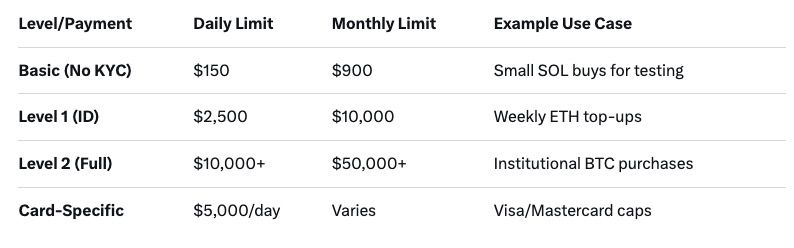
  5. Tiered Access: Basic (no KYC): $150/day. Level 1 ($2,500/month): ID only. Level 2 ($10K+/month): Full docs.

In 2025, EU users benefit from PSD2 for faster bank links; US faces stricter FinCEN rules. Tip: Use clear lighting—90% approvals on first try.

Common Issue: Failed selfies? Retry in good light; contact [email protected].

Supported Assets | Fees and Limits

Supported Assets, Fees, and Limits in 2025

MoonPay's offerings evolve with market demand—focus on majors for stability.

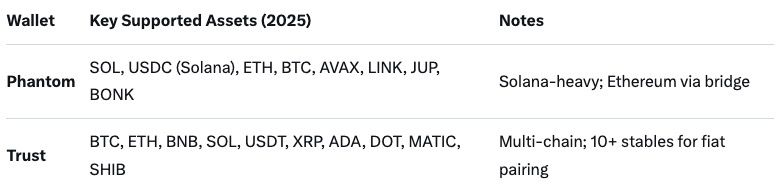
Supported Cryptocurrencies

Over 100 assets, wallet-dependent:

postImage

Fiat: 40+ currencies (USD, EUR, GBP primary). Min purchase: $20 equivalent.

Fees Structure

Transparent but tiered—expect 4.5% service + 1% card processing (total ~5.5%):

  • Credit/Debit Card: 4.5% + $3.99 min (e.g., $20 buy: $5.09 fee).
  • Apple/Google Pay: Same as card.
  • Bank Transfer (ACH/SEPA): 1% (cheaper for large amounts).
  • Network Gas: Added post-purchase (e.g., $0.50 SOL).

2025 Update: Dynamic pricing—fees drop 0.5% for verified users over $1K/month. No hidden spreads on quotes.

Transaction Limits

Vary by verification/payment:

postImage

Resets: Daily at midnight UTC; monthly on verification date. Exceed? Upgrade or wait—support can expedite.

Phantom Flow | Trust Flow | Errors

Step-by-Step: Buying Crypto with MoonPay in Phantom Wallet

Phantom's MoonPay integration is Solana-optimized—perfect for fast, low-fee buys.

Prerequisites

  • Phantom app/wallet installed and funded with minimal SOL (~$1 gas).
  • Verified MoonPay account (or start during flow).

Detailed Steps (December 2025)

  1. Open Phantom: Launch app/extension; ensure connected to Solana Mainnet [Networks > Solana].
  2. Navigate to Buy: Tap "+" or "Buy" tab (bottom menu). Select "Buy Crypto" – MoonPay widget loads automatically.
  3. Choose Asset and Amount: Search/select e.g., SOL or USDC. Enter fiat amount ($50+). Preview: Real-time quote shows total incl. fees (e.g., $50 SOL = $52.75).
  4. Payment Method: Click "Credit/Debit Card." Enter card details (number, expiry, CVV). For Apple Pay: Biometric confirm. Address auto-fills from KYC.
  5. Verify and Confirm: Review summary—tap "Buy Now." 3D Secure (OTP) if bank requires. Transaction processes (1-3 min).
  6. Receive Crypto: Funds appear in Phantom balance instantly. Track via [Activity > Recent].

Pro Tip: For ETH on Phantom, select "Ethereum" network first—MoonPay bridges automatically.

Time: 2-5 minutes. Success Rate: 95% for verified users.

Trust Wallet Flow

Step-by-Step: Buying Crypto with MoonPay in Trust Wallet

Trust Wallet's 2025 MoonPay partnership expands to 190 countries, emphasizing multi-chain flexibility.

Prerequisites

  • Trust Wallet installed; multi-chain enabled [Settings > Networks].
  • Basic KYC if over $150.

Detailed Steps (December 2025)

  1. Launch Trust Wallet: Open app; select wallet/home screen.
  2. Access Buy Feature: Tap "Buy" (top-right icon) or search bar > "Buy Crypto." MoonPay integration prompts.
  3. Select Chain and Asset: Choose network (e.g., Ethereum for ETH, Solana for SOL). Pick asset from 100+ list. Input fiat ($20 min, e.g., €50 BTC).
  4. Enter Payment Details: Opt for "Card" – input Visa/Mastercard info. Supports local cards (e.g., Revolut in EU). Quote: Includes 4.5% fee + gas (~$2 ETH).
  5. Security Check: Complete captcha/OTP. For new users, quick KYC popup (ID selfie).
  6. Execute Purchase: Hit "Confirm Purchase." Processing: 2-4 minutes; crypto credits to selected address.
  7. Confirmation: Notification + transaction history entry. Withdraw to other chains via DApp browser if needed.

Unique: Trust's built-in browser lets you buy then swap in-app (e.g., to BNB).

Fees and Limits | Common Errors

Common Errors and Troubleshooting

Even seamless services hit snags—here's how to fix MoonPay issues in 2025.

Frequent Errors

  1. "Payment Declined": Bank flags crypto buys. Fix: Contact issuer (e.g., Chase allows post-2024); use prepaid/Apple Pay. 40% of errors.
  2. KYC Rejection: Blurry docs. Solution: Retake in natural light; appeal via support (response <24h).
  3. "Insufficient Funds": Forgets gas. Add via free faucet (solfaucet.com for SOL).
  4. Network Congestion: Delays during peaks. Wait 10-15 min; retry off-peak.
  5. Unsupported Region/Card: VPN workaround risky—switch to bank transfer (1% fee).
  6. Wallet Mismatch: Wrong chain selected. Double-check before confirm.

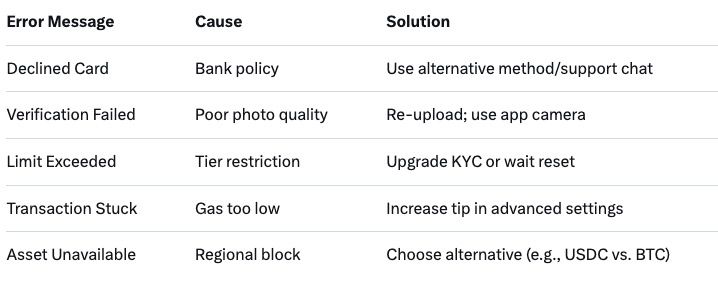
Table of Quick Fixes:

postImage

Support: 24/7 chat in app; average resolution 5 min. Pro: Enable notifications for status.

Baltex.io Section

How Baltex.io Fits as a Multi-Chain Swap Hub After Purchase

Once you've bought crypto via MoonPay, the real fun begins—optimizing, bridging, or swapping across chains. Baltex.io, a non-custodial instant swap aggregator, serves as your post-purchase powerhouse, integrating seamlessly with Phantom and Trust Wallet outputs.

Why Baltex.io Post-MoonPay?

  • Direct Wallet Connect: Link Phantom/Trust via WalletConnect—no exports needed.
  • Multi-Chain Routing: Bought SOL in Phantom? Swap to ETH on Arbitrum or USDC on BNB in one click—aggregates 20+ DEXs/bridges for best rates.
  • Fee Optimization: MoonPay's 4.5% done? Baltex.io keeps swaps under 0.5% + gas, bypassing high Ethereum fees via L2 paths.
  • Bridging Made Easy: Route assets without Wormhole delays—e.g., Phantom SOL to Trust's Polygon for DeFi yields.
  • Privacy Tools: Mix routes obscure purchase trails, ideal after fiat on-ramps.

Quick Workflow Example

  1. Buy $100 SOL in Phantom via MoonPay.
  2. Open Baltex.io in browser/DApp (baltex.io).
  3. Connect Phantom; select SOL > ETH.
  4. Preview route (e.g., Jupiter DEX + LayerZero bridge).
  5. Confirm—receive in Trust Wallet (Ethereum network).

In 2025, Baltex.io's AI routing predicts slippage, saving 20-30% vs. manual. No KYC for swaps; unlimited volumes. For intermediates: Use for arbitrage (buy low-fee SOL, swap to high-yield stables). Beginners: One-tap liquidity—perfect complement to MoonPay's entry point. Visit https://baltex.io to start swapping.

FAQ

FAQ

Q: What is the minimum to buy crypto with MoonPay in Phantom? A: $20 equivalent in fiat; supports SOL, ETH, BTC primarily.

Q: How long does MoonPay verification take in 2025? A: Instant for basics; 24-48 hours for full Level 2 access.

Q: Are there fees for buying in Trust Wallet via MoonPay? A: 4.5% service + card/network fees; min $3.99.

Q: Can I buy non-Solana assets in Phantom with MoonPay? A: Yes—ETH, BTC via cross-chain support.

Q: What if my card is declined on MoonPay? A: Try Apple Pay or bank transfer; contact bank for crypto policy.

Q: Does MoonPay support Apple Pay in Trust Wallet? A: Yes—seamless biometric payments in 2025.

Q: How do limits work post-verification? A: Up to $10K/day for Level 2; resets monthly.

Conclusion

As of December 19, 2025, MoonPay remains the go-to for beginner-friendly credit card crypto buys in Phantom and Trust Wallet—offering 100+ assets, quick verification, and direct deposits amid Solana's boom. With fees at 4.5% and limits scaling to $10K+, it's accessible yet scalable for intermediates. Follow the steps for Phantom's Solana speed or Trust's multi-chain versatility, troubleshooting errors like declines with ease. Post-purchase, baltex.io unlocks swapping/bridging superpowers, turning fiat inflows into optimized DeFi plays. Whether testing with $20 SOL or scaling ETH positions, MoonPay + wallets = safe entry to crypto. Start small, verify securely, and swap smart—your 2025 portfolio awaits.

MoonPay Tutorial 2025: How to Buy Crypto with Credit Card in Phantom & Trust Wallet | Baltex交易所