 2 minutes to read
 Ecosystem
How to Use PulseChain Bridge: Step-by-Step for Cross-Chain Transfers in 2025
TL;DR
PulseChain Bridge (official v2) lets you move ERC-20 tokens and PLS/HEX between Ethereum, PulseChain, and Base in 5–45 minutes. Fees: 0.1–0.5% + gas. Always use the official site pulsechain.com/bridge. For faster transfers, unsupported tokens, or 200+ other chains, use baltex.io as a direct multi-chain alternative (often <30 seconds and <0.1% total fee).
Introduction: Why PulseChain Bridge Still Matters in 2025
Launched in May 2023 by Richard Heart, PulseChain remains one of the fastest EVM forks (4× faster than Ethereum, 3-second blocks, sub-cent fees). The official PulseChain Bridge is the only trust-minimized way to move real assets between Ethereum L1 and PulseChain without centralized custodians.
In 2025, after the Dencun + Pectra upgrades, Ethereum gas is low, but PulseChain is still 50–200× cheaper for DeFi. Thousands still bridge daily for HEX staking, PulseX liquidity, or farming 1000%+ APYs. This guide covers the current v2 bridge (2025 interface), exact steps, fees, timing, risks, and what to do when the bridge is slow or a token isn’t supported.
(Internal link: Jump straight to the 2025 Step-by-Step Guide)
Supported Networks & Tokens in 2025
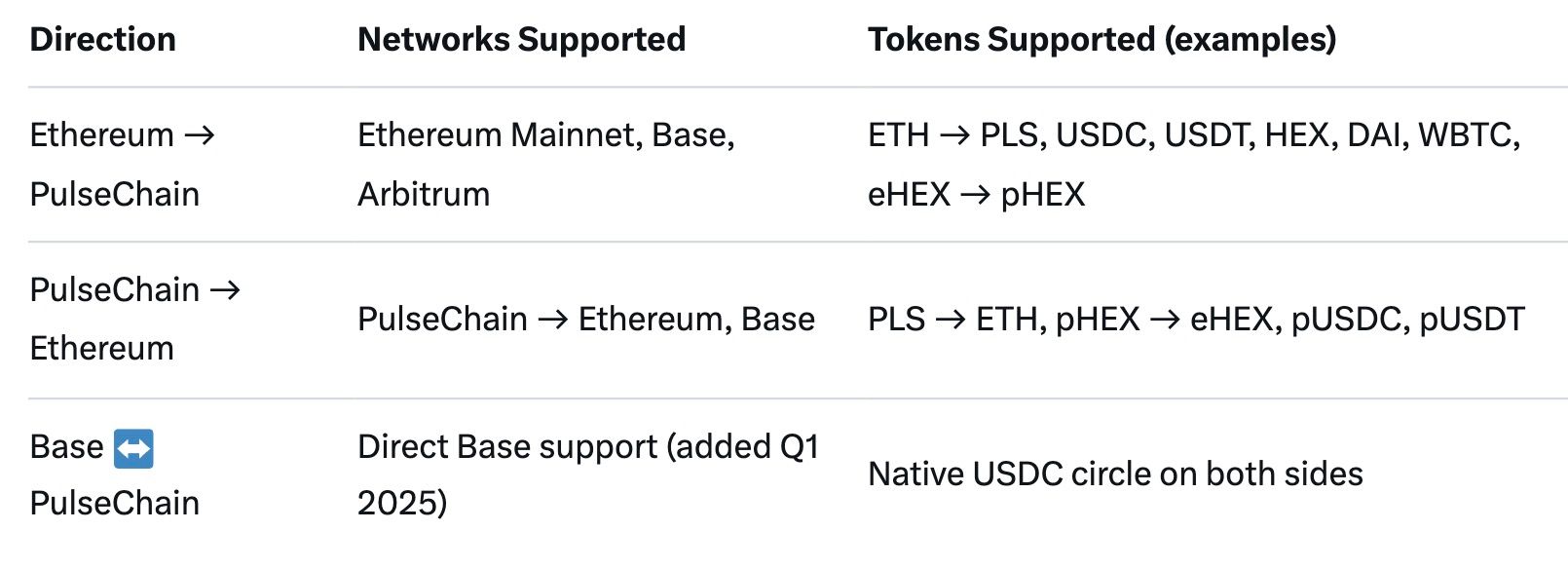
Note: Not every ERC-20 is whitelisted. Popular ones are; obscure meme coins usually aren’t. Check the token list inside the bridge before sending.
Current Fees & Timing (2025 Real Numbers)

Pro tip: Bridge during UTC weekend nights for cheapest Ethereum gas.
Risks & Common Errors You Must Know
- Wrong network selection → permanent loss
- Sending unsupported token → funds stuck until manually recovered (weeks)
- Using fake bridge sites (pulsechainbridge.com, pulse-bridge.org = scams)
- Not claiming on destination chain → funds sit unclaimed forever
- Front-running on Ethereum side during high gas periods
Always bookmark the official URL: https://pulsechain.com/bridge
2025 Step-by-Step Bridge Guide (With Screenshot Descriptions)
Phase 1: Preparation
- Install MetaMask or Rabby Wallet (recommended in 2025).
- Add PulseChain network (auto-import from chainlist.org or manually): RPC: https://rpc.pulsechain.com Chain ID: 369 Symbol: PLS
- Add Base if needed (Chain ID 8453).
- Have gas on BOTH sides: ETH on source, PLS on PulseChain.
Phase 2: Bridging FROM Ethereum/Base → PulseChain (Most Common)
- Go to https://pulsechain.com/bridge (bookmark it!).
- Connect wallet → top-right “Connect Wallet” → choose MetaMask → approve on Ethereum/Base.
- Select “From” network = Ethereum or Base.
- Select “To” network = PulseChain.
- Choose token (e.g., USDC, HEX, ETH).
- Enter amount → bridge auto-calculates fee and min received. Screenshot note: You’ll see a blue “Approve” button first (only once per token), then green “Bridge” button.
- Click “Approve” → set gas (Medium or Aggressive) → confirm in wallet.
- Wait 20–60 seconds → “Bridge” button becomes active.
- Click “Bridge” → confirm second transaction.
- Wait 5–45 minutes → progress bar + TxID links.
- Switch wallet to PulseChain network → click “Claim” on the same page.
- Pay tiny PLS gas → tokens appear as pUSDC, pHEX, PLS, etc.
Phase 3: Bridging FROM PulseChain → Ethereum/Base
- Same site → connect wallet while on PulseChain network.
- “From” = PulseChain, “To” = Ethereum or Base.
- Select pHEX, pUSDC, PLS, etc.
- Approve + Bridge (same two-step).
- Wait 3–15 minutes → switch to Ethereum/Base network → Claim. Screenshot note: Claim button only appears after finality (32 Ethereum confirmations if going to ETH L1).
Phase 4: Tracking & Troubleshooting
- Click the TxID links → opens PulseScan or Etherscan.
- “Stuck”? Refresh page, ensure correct network, wait longer.
- Still stuck after 2 hours → Discord bridge-support channel (official only).
(Internal link: See exact Fees & Timing again)
When PulseChain Bridge Is Too Slow or Token Not Supported: Use Baltex.io
The official bridge is secure but has limitations in 2025:
- Only 3 source chains
- 10–45 min wait times
- Many newer tokens (e.g., most Base memes, TON, Solana, SUI) not supported
- No direct PLS → SOL or HEX → BTC
This is exactly where baltex.io dominates as a true multi-chain swap hub.
Baltex.io Advantages vs. PulseChain Bridge

How to Replace the Bridge with Baltex in 3 Clicks
- Go to https://baltex.io
- Connect wallet (MetaMask/Phantom/whatever).
- Choose source (e.g., PulseChain → pHEX) → destination (e.g., Solana → SOL).
- Confirm → done. No claim step, no waiting 45 minutes.
Real 2025 example: Move 1 million pHEX → USDC on Base
- Bridge official way: 38 min + $11 fee
- Baltex way: 18 seconds + $0.87 total fee
Many PulseChain OGs now keep only enough PLS for gas and do everything else via Baltex cross-chain swaps. It’s effectively a “bridge on steroids.”
FAQ
Q: Is pulsechain.com/bridge the only safe bridge? A: Yes. Any other domain is a scam in 2025.
Q: How long does the bridge take in 2025? A: Ethereum → PulseChain: 10–45 min; PulseChain → Ethereum: 5–20 min.
Q: Can I bridge PLS directly to Solana or TON? A: No on official bridge. Yes instantly on baltex.io.
Q: What happens if I send an unsupported token? A: Funds are recoverable but may take weeks via support.
Q: Do I need PLS gas on PulseChain side? A: Yes, ~$0.001 worth for claiming.
Q: Is there a minimum amount? A: Effectively $10–$20 equivalent to cover fees.
Conclusion: Master the Bridge or Skip It Entirely
In 2025, the official PulseChain Bridge remains the gold standard for trust-minimized transfers between Ethereum, Base, and PulseChain. Follow the exact steps above, use only the official site, and you’ll move millions safely.
But when you need speed, 200+ chains, or tokens the bridge doesn’t support yet, baltex.io has become the daily driver for most active PulseChain users. Many now treat the official bridge only for initial large migrations and use Baltex for everything else.
Bookmark both tools, keep a little PLS for gas, and you’re ready for anything the multi-chain future throws at you.
Happy bridging (or instant swapping)!
Related reading: Across Protocol Review: The Cheapest Bridge for Ethereum L2s.
Related reading: Across Protocol Review: The Cheapest Bridge for Ethereum L2s.
You can read our full breakdown in Linea Bridge Tutorial: Cheapest Ways to Move ETH (July 2026).
You can read our full breakdown in Linea Bridge Tutorial: Cheapest Ways to Move ETH (July 2026).