



 3 minutes to read
 Ecosystem
MoonPay Tutorial 2026: How to Buy Crypto with Credit Card in Phantom & Trust Wallet
TL;DR
MoonPay is a fiat-to-crypto on-ramp integrated into Phantom (Solana-focused) and Trust Wallet (multi-chain), allowing seamless credit card purchases of 100+ cryptos like BTC, ETH, and SOL starting at $20. In December 2026, expect 4.5% fees (min $3.99), KYC verification, and limits up to $10K/day post-approval. Steps: Install wallet, enable MoonPay, verify ID, select asset/amount, pay via card. Common errors: Bank blocks—use alternatives like Apple Pay. After buying, baltex.io enables multi-chain swaps for optimization.
What Is MoonPay and Why Use It in Wallets?
MoonPay is a user-friendly fiat gateway launched in 2019, specializing in instant crypto purchases with traditional payment methods like credit/debit cards, Apple Pay, Google Pay, and bank transfers. By December 19, 2026, it supports over 100 cryptocurrencies across 190+ countries, processing billions in volume annually. Its seamless integration with non-custodial wallets like Phantom and Trust Wallet makes it ideal for beginners avoiding centralized exchanges.
For crypto newcomers: MoonPay eliminates the hassle of KYC on multiple platforms—verify once, buy anywhere. Intermediate users appreciate its speed (under 5 minutes for most transactions) and global accessibility, especially amid rising Solana and multi-chain adoption.
Key benefits in 2026:
- Direct Wallet Deposits: Crypto lands in your wallet instantly, no transfers needed.
- Regulatory Compliance: SOC 2 certified, with built-in AML/KYC for secure fiat rails.
- Payment Flexibility: Cards from Visa/Mastercard, plus local options like SEPA in Europe.
Compared to alternatives like Ramp or Transak, MoonPay excels in wallet integrations and lower minimums ($20 vs. $50+). However, fees are higher (4.5%)—offset by convenience.
Phantom Setup | Trust Wallet Setup | Fees and Limits
Wallet Setup: Preparing Phantom and Trust Wallet
Before buying, ensure your wallets are ready. Both are free, mobile-first apps supporting hardware like Ledger.
Phantom Wallet Setup
Phantom, Solana's flagship wallet, also handles Ethereum and Polygon via 2026 updates.
- Download and Install: Get from phantom.app (iOS/Android) or Chrome extension. Verify via official site to avoid phishing.
- Create/Import Wallet: Generate a new seed phrase (24 words)—back it up offline. Or import existing via [Settings > Import Private Key].
- Enable Security: Set a PIN/biometrics; enable auto-lock. For 2026, opt-in to "Transaction Simulations" for scam alerts.
- Fund for Gas: Add ~$5 SOL for network fees (via free faucet if testing).
Phantom's clean UI shines for Solana natives—expect MoonPay prompt on first "Buy" click.
Trust Wallet Setup
Trust Wallet, Binance-backed and multi-chain, supports 100+ networks.
- Download and Install: From trustwallet.com (iOS/Android). Avoid app store fakes—check developer (Six Days LLC).
- Create/Import: New wallet generates 12-word phrase; import via [Settings > Wallets > +]. Encrypt backup.
- Security Features: Enable Face ID/Touch ID; activate "Security Scanner" for malicious dApps.
- Initial Funding: Small ETH/BNB for gas—use built-in browser for test swaps.
Trust's 2026 partnership with MoonPay streamlines buys across chains like BNB and Avalanche.
Step-by-Step Phantom | Step-by-Step Trust
Verification Process: KYC with MoonPay
MoonPay requires identity verification for compliance—quick for most, but mandatory for cards.
Steps (Applies to Both Wallets)
- Initiate KYC: During first buy, MoonPay widget opens—click "Verify Identity."
- Document Upload: Provide government ID (passport/driver's license) and selfie. Use liveness detection (nod/smile).
- Address Proof: For higher limits, upload utility bill/bank statement (under 3 months old).
- Review and Submit: AI scans for fakes; manual if flagged. Approval: Instant for basics, 24-48 hours for full.
- Tiered Access: Basic (no KYC): $150/day. Level 1 ($2,500/month): ID only. Level 2 ($10K+/month): Full docs.
In 2026, EU users benefit from PSD2 for faster bank links; US faces stricter FinCEN rules. Tip: Use clear lighting—90% approvals on first try.
Common Issue: Failed selfies? Retry in good light; contact [email protected].
Supported Assets | Fees and Limits
Supported Assets, Fees, and Limits in 2026
MoonPay's offerings evolve with market demand—focus on majors for stability.
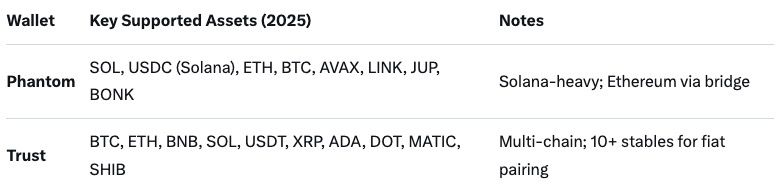
Supported Cryptocurrencies
Over 100 assets, wallet-dependent:
Fiat: 40+ currencies (USD, EUR, GBP primary). Min purchase: $20 equivalent.
Fees Structure
Transparent but tiered—expect 4.5% service + 1% card processing (total ~5.5%):
- Credit/Debit Card: 4.5% + $3.99 min (e.g., $20 buy: $5.09 fee).
- Apple/Google Pay: Same as card.
- Bank Transfer (ACH/SEPA): 1% (cheaper for large amounts).
- Network Gas: Added post-purchase (e.g., $0.50 SOL).
2026 Update: Dynamic pricing—fees drop 0.5% for verified users over $1K/month. No hidden spreads on quotes.
Transaction Limits
Vary by verification/payment:
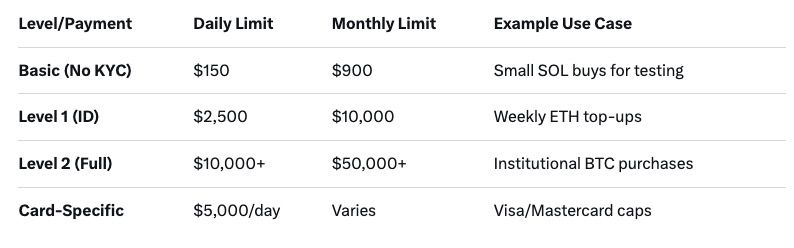
Resets: Daily at midnight UTC; monthly on verification date. Exceed? Upgrade or wait—support can expedite.
Phantom Flow | Trust Flow | Errors
Step-by-Step: Buying Crypto with MoonPay in Phantom Wallet
Phantom's MoonPay integration is Solana-optimized—perfect for fast, low-fee buys.
Prerequisites
- Phantom app/wallet installed and funded with minimal SOL (~$1 gas).
- Verified MoonPay account (or start during flow).
Detailed Steps (December 2026)
- Open Phantom: Launch app/extension; ensure connected to Solana Mainnet [Networks > Solana].
- Navigate to Buy: Tap "+" or "Buy" tab (bottom menu). Select "Buy Crypto" – MoonPay widget loads automatically.
- Choose Asset and Amount: Search/select e.g., SOL or USDC. Enter fiat amount ($50+). Preview: Real-time quote shows total incl. fees (e.g., $50 SOL = $52.75).
- Payment Method: Click "Credit/Debit Card." Enter card details (number, expiry, CVV). For Apple Pay: Biometric confirm. Address auto-fills from KYC.
- Verify and Confirm: Review summary—tap "Buy Now." 3D Secure (OTP) if bank requires. Transaction processes (1-3 min).
- Receive Crypto: Funds appear in Phantom balance instantly. Track via [Activity > Recent].
Pro Tip: For ETH on Phantom, select "Ethereum" network first—MoonPay bridges automatically.
Time: 2-5 minutes. Success Rate: 95% for verified users.
Step-by-Step: Buying Crypto with MoonPay in Trust Wallet
Trust Wallet's 2026 MoonPay partnership expands to 190 countries, emphasizing multi-chain flexibility.
Prerequisites
- Trust Wallet installed; multi-chain enabled [Settings > Networks].
- Basic KYC if over $150.
Detailed Steps (December 2026)
- Launch Trust Wallet: Open app; select wallet/home screen.
- Access Buy Feature: Tap "Buy" (top-right icon) or search bar > "Buy Crypto." MoonPay integration prompts.
- Select Chain and Asset: Choose network (e.g., Ethereum for ETH, Solana for SOL). Pick asset from 100+ list. Input fiat ($20 min, e.g., €50 BTC).
- Enter Payment Details: Opt for "Card" – input Visa/Mastercard info. Supports local cards (e.g., Revolut in EU). Quote: Includes 4.5% fee + gas (~$2 ETH).
- Security Check: Complete captcha/OTP. For new users, quick KYC popup (ID selfie).
- Execute Purchase: Hit "Confirm Purchase." Processing: 2-4 minutes; crypto credits to selected address.
- Confirmation: Notification + transaction history entry. Withdraw to other chains via DApp browser if needed.
Unique: Trust's built-in browser lets you buy then swap in-app (e.g., to BNB).
Fees and Limits | Common Errors
Common Errors and Troubleshooting
Even seamless services hit snags—here's how to fix MoonPay issues in 2026.
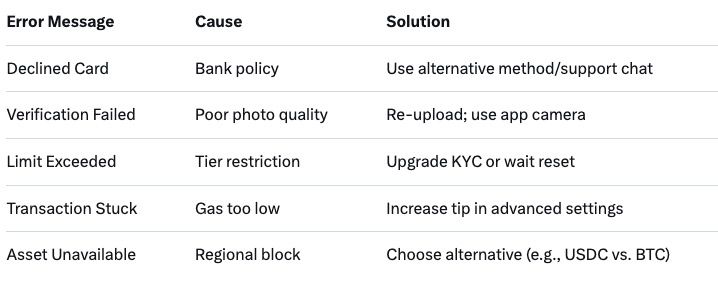
Frequent Errors
- "Payment Declined": Bank flags crypto buys. Fix: Contact issuer (e.g., Chase allows post-2024); use prepaid/Apple Pay. 40% of errors.
- KYC Rejection: Blurry docs. Solution: Retake in natural light; appeal via support (response <24h).
- "Insufficient Funds": Forgets gas. Add via free faucet (solfaucet.com for SOL).
- Network Congestion: Delays during peaks. Wait 10-15 min; retry off-peak.
- Unsupported Region/Card: VPN workaround risky—switch to bank transfer (1% fee).
- Wallet Mismatch: Wrong chain selected. Double-check before confirm.
Table of Quick Fixes:
Support: 24/7 chat in app; average resolution 5 min. Pro: Enable notifications for status.
How Baltex.io Fits as a Multi-Chain Swap Hub After Purchase
Once you've bought crypto via MoonPay, the real fun begins—optimizing, bridging, or swapping across chains. Baltex.io, a non-custodial instant swap aggregator, serves as your post-purchase powerhouse, integrating seamlessly with Phantom and Trust Wallet outputs.
Why Baltex.io Post-MoonPay?
- Direct Wallet Connect: Link Phantom/Trust via WalletConnect—no exports needed.
- Multi-Chain Routing: Bought SOL in Phantom? Swap to ETH on Arbitrum or USDC on BNB in one click—aggregates 20+ DEXs/bridges for best rates.
- Fee Optimization: MoonPay's 4.5% done? Baltex.io keeps swaps under 0.5% + gas, bypassing high Ethereum fees via L2 paths.
- Bridging Made Easy: Route assets without Wormhole delays—e.g., Phantom SOL to Trust's Polygon for DeFi yields.
- Privacy Tools: Mix routes obscure purchase trails, ideal after fiat on-ramps.
Quick Workflow Example
- Buy $100 SOL in Phantom via MoonPay.
- Open Baltex.io in browser/DApp (baltex.io).
- Connect Phantom; select SOL > ETH.
- Preview route (e.g., Jupiter DEX + LayerZero bridge).
- Confirm—receive in Trust Wallet (Ethereum network).
In 2026, Baltex.io's AI routing predicts slippage, saving 20-30% vs. manual. No KYC for swaps; unlimited volumes. For intermediates: Use for arbitrage (buy low-fee SOL, swap to high-yield stables). Beginners: One-tap liquidity—perfect complement to MoonPay's entry point. Visit https://baltex.io to start swapping.
FAQ
Q: What is the minimum to buy crypto with MoonPay in Phantom? A: $20 equivalent in fiat; supports SOL, ETH, BTC primarily.
Q: How long does MoonPay verification take in 2026? A: Instant for basics; 24-48 hours for full Level 2 access.
Q: Are there fees for buying in Trust Wallet via MoonPay? A: 4.5% service + card/network fees; min $3.99.
Q: Can I buy non-Solana assets in Phantom with MoonPay? A: Yes—ETH, BTC via cross-chain support.
Q: What if my card is declined on MoonPay? A: Try Apple Pay or bank transfer; contact bank for crypto policy.
Q: Does MoonPay support Apple Pay in Trust Wallet? A: Yes—seamless biometric payments in 2026.
Q: How do limits work post-verification? A: Up to $10K/day for Level 2; resets monthly.
Conclusion
As of December 19, 2026, MoonPay remains the go-to for beginner-friendly credit card crypto buys in Phantom and Trust Wallet—offering 100+ assets, quick verification, and direct deposits amid Solana's boom. With fees at 4.5% and limits scaling to $10K+, it's accessible yet scalable for intermediates. Follow the steps for Phantom's Solana speed or Trust's multi-chain versatility, troubleshooting errors like declines with ease. Post-purchase, baltex.io unlocks swapping/bridging superpowers, turning fiat inflows into optimized DeFi plays. Whether testing with $20 SOL or scaling ETH positions, MoonPay + wallets = safe entry to crypto. Start small, verify securely, and swap smart—your 2026 portfolio awaits.
See others posts

G. Khan

SHIB Ecosystem Rally: Can Shibarium and the Burn Rate Move the Price?
Ecosystem
G. Khan
Shiba Inu Price Prediction 2027 (September 2026 Update)
Ecosystem
G. Khan
Shiba Inu Price Prediction 2030: SHIB 2030 Forecast (September 2026 Update)
Ecosystem
G. Khan
Shiba Inu (SHIB) Price Prediction 2026, 2027 and 2030 (September 2026 Update)
Ecosystem
G. Khan
Dogecoin News and Price Predictions Today (September 2026 Update)
Ecosystem
G. Khan
Dogecoin Price Prediction 2030: Long-Term DOGE Forecast (September 2026 Update)
Ecosystem