
 3 минут на чтение
 Ecosystem
MoonPay is a fiat-to-crypto on-ramp integrated into Phantom (Solana-focused) and Trust Wallet (multi-chain), allowing seamless credit card purchases of 100+ cryptos like BTC, ETH, and SOL starting at $20. In December 2025, expect 4.5% fees (min $3.99), KYC verification, and limits up to $10K/day post-approval. Steps: Install wallet, enable MoonPay, verify ID, select asset/amount, pay via card. Common errors: Bank blocks—use alternatives like Apple Pay. After buying, baltex.io enables multi-chain swaps for optimization.
MoonPay is a user-friendly fiat gateway launched in 2019, specializing in instant crypto purchases with traditional payment methods like credit/debit cards, Apple Pay, Google Pay, and bank transfers. By December 19, 2025, it supports over 100 cryptocurrencies across 190+ countries, processing billions in volume annually. Its seamless integration with non-custodial wallets like Phantom and Trust Wallet makes it ideal for beginners avoiding centralized exchanges.
For crypto newcomers: MoonPay eliminates the hassle of KYC on multiple platforms—verify once, buy anywhere. Intermediate users appreciate its speed (under 5 minutes for most transactions) and global accessibility, especially amid rising Solana and multi-chain adoption.
Key benefits in 2025:
Compared to alternatives like Ramp or Transak, MoonPay excels in wallet integrations and lower minimums ($20 vs. $50+). However, fees are higher (4.5%)—offset by convenience.
Phantom Setup | Trust Wallet Setup | Fees and Limits
Before buying, ensure your wallets are ready. Both are free, mobile-first apps supporting hardware like Ledger.
Phantom, Solana's flagship wallet, also handles Ethereum and Polygon via 2025 updates.
Phantom's clean UI shines for Solana natives—expect MoonPay prompt on first "Buy" click.
Trust Wallet, Binance-backed and multi-chain, supports 100+ networks.
Trust's 2025 partnership with MoonPay streamlines buys across chains like BNB and Avalanche.
Step-by-Step Phantom | Step-by-Step Trust
MoonPay requires identity verification for compliance—quick for most, but mandatory for cards.
In 2025, EU users benefit from PSD2 for faster bank links; US faces stricter FinCEN rules. Tip: Use clear lighting—90% approvals on first try.
Common Issue: Failed selfies? Retry in good light; contact [email protected].
Supported Assets | Fees and Limits
MoonPay's offerings evolve with market demand—focus on majors for stability.
Over 100 assets, wallet-dependent:
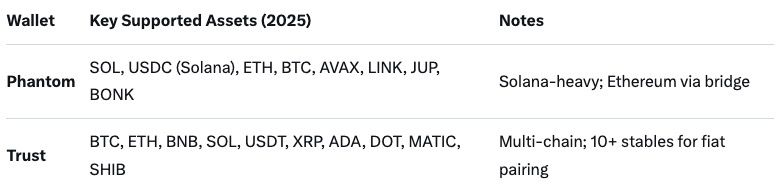
Fiat: 40+ currencies (USD, EUR, GBP primary). Min purchase: $20 equivalent.
Transparent but tiered—expect 4.5% service + 1% card processing (total ~5.5%):
2025 Update: Dynamic pricing—fees drop 0.5% for verified users over $1K/month. No hidden spreads on quotes.
Vary by verification/payment:
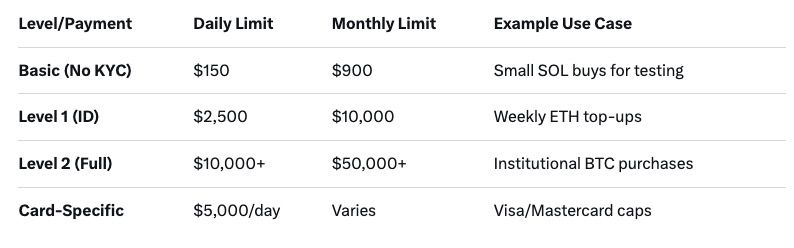
Resets: Daily at midnight UTC; monthly on verification date. Exceed? Upgrade or wait—support can expedite.
Phantom Flow | Trust Flow | Errors
Phantom's MoonPay integration is Solana-optimized—perfect for fast, low-fee buys.
Pro Tip: For ETH on Phantom, select "Ethereum" network first—MoonPay bridges automatically.
Time: 2-5 minutes. Success Rate: 95% for verified users.
Trust Wallet's 2025 MoonPay partnership expands to 190 countries, emphasizing multi-chain flexibility.
Unique: Trust's built-in browser lets you buy then swap in-app (e.g., to BNB).
Fees and Limits | Common Errors
Even seamless services hit snags—here's how to fix MoonPay issues in 2025.
Table of Quick Fixes:
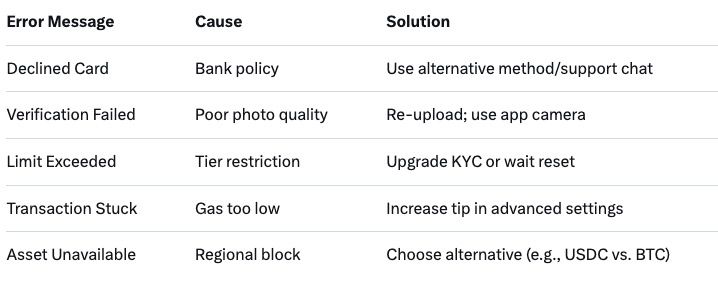
Support: 24/7 chat in app; average resolution 5 min. Pro: Enable notifications for status.
Once you've bought crypto via MoonPay, the real fun begins—optimizing, bridging, or swapping across chains. Baltex.io, a non-custodial instant swap aggregator, serves as your post-purchase powerhouse, integrating seamlessly with Phantom and Trust Wallet outputs.
In 2025, Baltex.io's AI routing predicts slippage, saving 20-30% vs. manual. No KYC for swaps; unlimited volumes. For intermediates: Use for arbitrage (buy low-fee SOL, swap to high-yield stables). Beginners: One-tap liquidity—perfect complement to MoonPay's entry point. Visit https://baltex.io to start swapping.
Q: What is the minimum to buy crypto with MoonPay in Phantom? A: $20 equivalent in fiat; supports SOL, ETH, BTC primarily.
Q: How long does MoonPay verification take in 2025? A: Instant for basics; 24-48 hours for full Level 2 access.
Q: Are there fees for buying in Trust Wallet via MoonPay? A: 4.5% service + card/network fees; min $3.99.
Q: Can I buy non-Solana assets in Phantom with MoonPay? A: Yes—ETH, BTC via cross-chain support.
Q: What if my card is declined on MoonPay? A: Try Apple Pay or bank transfer; contact bank for crypto policy.
Q: Does MoonPay support Apple Pay in Trust Wallet? A: Yes—seamless biometric payments in 2025.
Q: How do limits work post-verification? A: Up to $10K/day for Level 2; resets monthly.
As of December 19, 2025, MoonPay remains the go-to for beginner-friendly credit card crypto buys in Phantom and Trust Wallet—offering 100+ assets, quick verification, and direct deposits amid Solana's boom. With fees at 4.5% and limits scaling to $10K+, it's accessible yet scalable for intermediates. Follow the steps for Phantom's Solana speed or Trust's multi-chain versatility, troubleshooting errors like declines with ease. Post-purchase, baltex.io unlocks swapping/bridging superpowers, turning fiat inflows into optimized DeFi plays. Whether testing with $20 SOL or scaling ETH positions, MoonPay + wallets = safe entry to crypto. Start small, verify securely, and swap smart—your 2025 portfolio awaits.
G. Khan
 Ecosystem
G. Khan
Ecosystem
G. Khan
Ecosystem
G. Khan
Ecosystem
G. Khan
Ecosystem
G. Khan
Ecosystem
