 1 minute to read
 Ecosystem
Monero GUI Wallet vs CLI Wallet: Which Should You Use in 2026
TLDR In 2026, the Monero GUI Wallet is the best choice for most users who want an intuitive interface, visual transaction management, and easy hardware wallet integration, while the CLI Wallet is preferred by advanced users, developers, and automation enthusiasts who need maximum control, scripting capabilities, and minimal resource usage. Both are fully non-custodial and integrate Monero’s privacy features (ring signatures, stealth addresses, RingCT) perfectly, but the GUI offers better usability at the cost of slightly higher resource demands, whereas the CLI is lighter, more powerful for automation, and has a steeper learning curve. For practical XMR swaps and cross-chain liquidity from either wallet without KYC, baltex.io enables shielded routing—see our what is Monero guide and best monero swappers guides. Overall, choose GUI for daily ease or CLI for power and automation.
Choosing between the Monero GUI Wallet and the Monero CLI Wallet in 2026 depends on your priorities: ease of use versus maximum control and automation. Both wallets are official, non-custodial, and fully compatible with Monero’s privacy protocol, but they serve different user profiles. The GUI provides a polished graphical interface ideal for beginners and daily users, while the CLI is a command-line tool favored by developers, miners, and advanced privacy advocates who need scripting and minimal overhead. This guide compares the two wallets across security assumptions, usability, performance, automation capabilities, node interaction, and risk profiles. It explains who each wallet is best for, common mistakes, and how both integrate with modern liquidity tools.
Security Assumptions and Architecture
Both the GUI and CLI wallets are fully non-custodial: your private keys never leave your device, and the software never holds your funds. They implement Monero’s complete privacy suite—ring signatures, stealth addresses, and RingCT—by default. The GUI runs as a desktop application with a visual interface, while the CLI is a terminal-based tool. Security assumptions are nearly identical: both rely on your seed phrase backup and proper operational hygiene.
The CLI has a smaller attack surface because it has no graphical components or extra dependencies, making it slightly more secure for paranoid users. The GUI includes additional code for the interface and node management, but it is still audited and official. In 2026, both support hardware wallet integration (Ledger and Trezor) for cold storage signing. As explained in our what is monero and how does monero works, security ultimately depends more on your operational practices than the wallet type.
Usability and User Experience
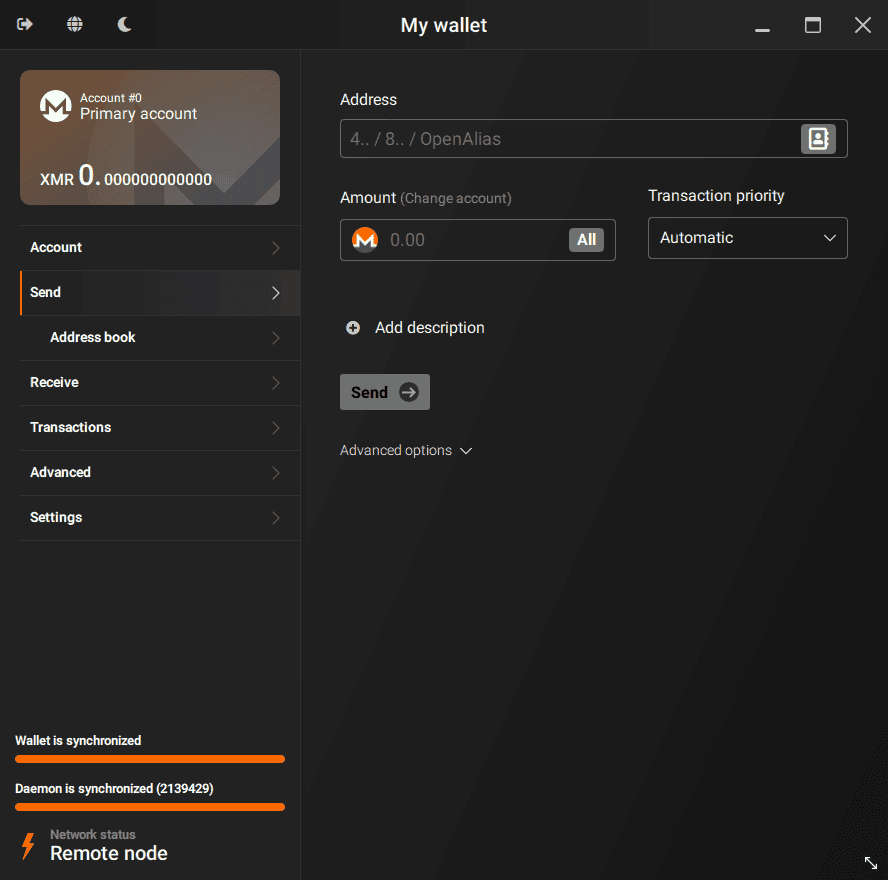
The Monero GUI Wallet offers a clean, intuitive graphical interface with tabs for overview, send, receive, history, and settings. It is designed for beginners and casual users who want to see balances, generate subaddresses, and review transactions visually. Setup is point-and-click, and the wallet includes helpful tooltips and address book features.
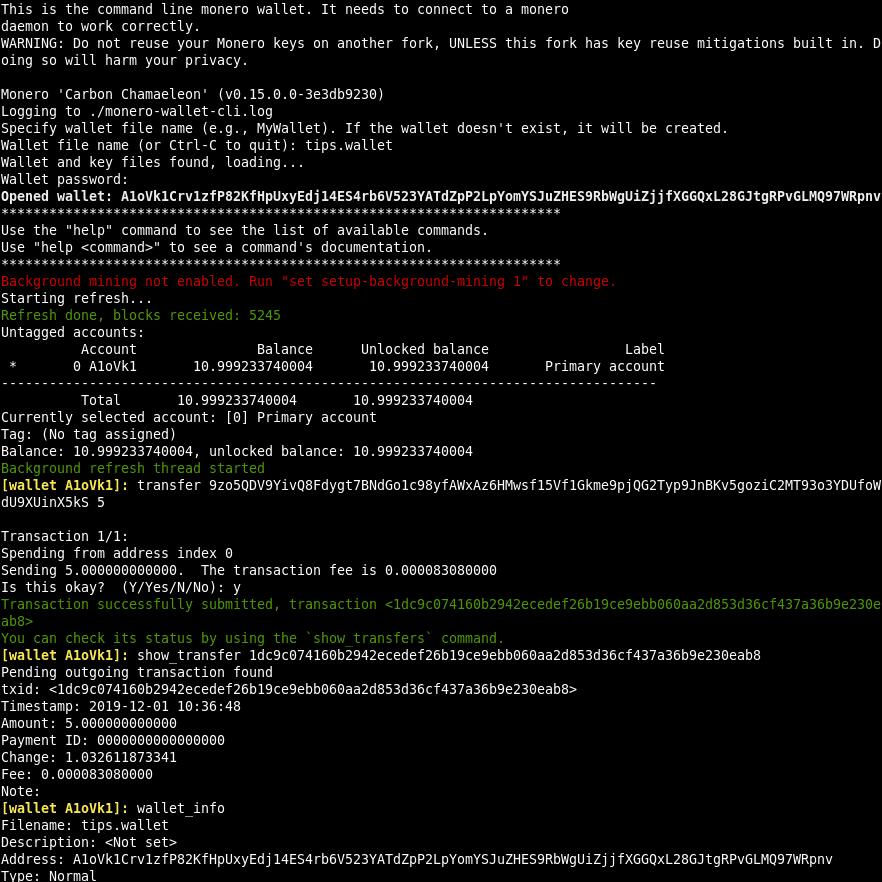
The CLI Wallet is entirely command-line based. You interact with it through terminal commands (monerod for the daemon and monero-wallet-cli for the wallet). It requires learning basic commands but gives precise control. Usability is lower for newcomers but extremely efficient for experienced users. As explained in our how to make a crypto wallet guide, the GUI lowers the barrier to entry, while the CLI rewards technical familiarity.
Performance and Resource Usage
The GUI Wallet is more resource-intensive because it runs a full graphical application and often includes a built-in node manager. On modern hardware it runs smoothly, but it uses more RAM and CPU than the CLI. The CLI is extremely lightweight: it can run on low-spec machines and uses minimal resources, making it ideal for servers or older hardware. Synchronization performance is comparable when using remote nodes, but the CLI allows finer control over daemon settings.
Automation Capabilities and Node Interaction
The CLI Wallet shines in automation. You can script wallet operations, integrate with monitoring tools, or run background tasks via cron jobs or systemd services. It interacts directly with the monerod daemon for full node control. The GUI is designed for manual use and has limited scripting support, though it can connect to a running daemon. Node interaction in the CLI is more granular—you can start, stop, and configure the daemon with precise flags.
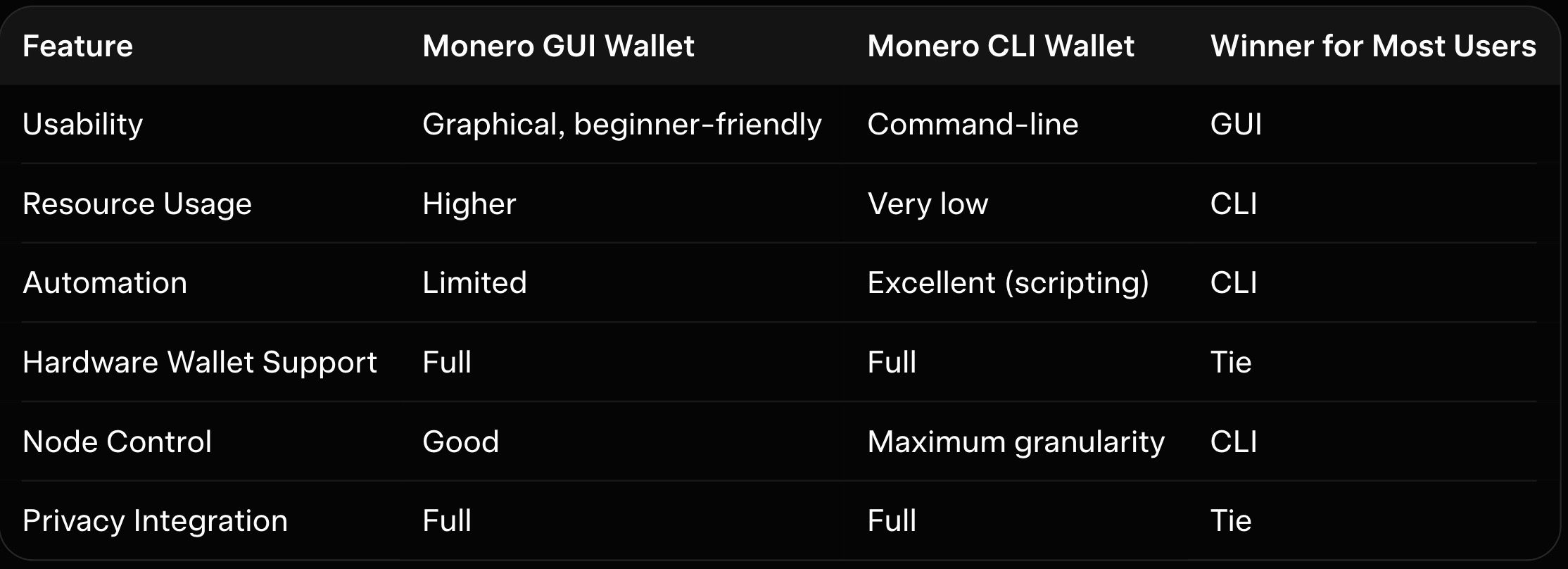
Here is the feature comparison table:
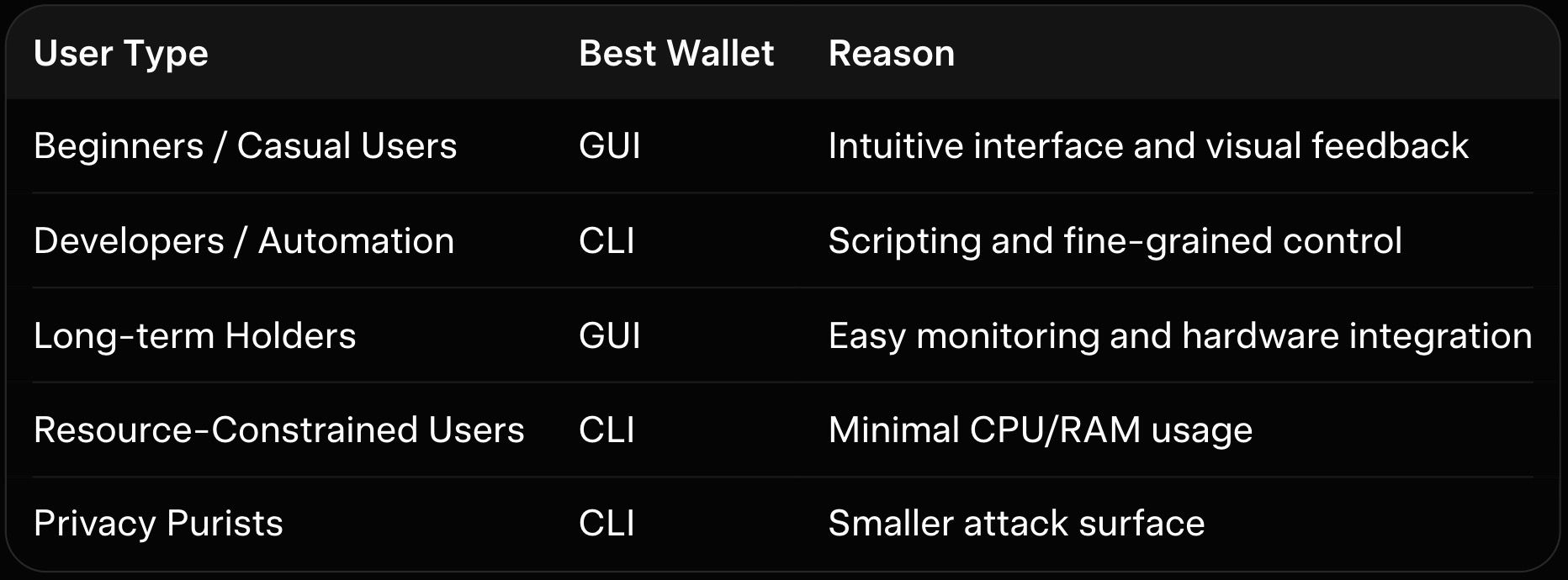
Here is a user scenarios table:
Common Mistakes and Who Should Use Which Wallet
Common mistakes include using the GUI on low-spec hardware (causing lag), failing to verify downloads, or exposing seed phrases digitally. Beginners often overlook subaddress usage, reducing privacy. Advanced users sometimes overcomplicate CLI commands instead of using simple scripts.
The GUI is best for beginners, long-term holders, and anyone who values ease of use. The CLI is best for developers, miners running background nodes, and users who need automation or run on limited hardware. As explained in our how monero works, choose the wallet that matches your technical comfort level.
How baltex.io Enables Practical XMR Swaps and Liquidity in Both Workflows
Whether you use the GUI or CLI, you will eventually need to swap or move XMR for liquidity. baltex.io works seamlessly with both wallets by scanning multiple no-KYC routes and liquidity sources internally. Private Swap mode inserts shielded Monero hops that fully break on-chain links using ring signatures and stealth addresses before delivering clean assets on destination chains. Settlements complete in 8–35 minutes even for cross-chain pairs, fees stay low at ~0.4–0.8%, and there are virtually no limits. Supporting over 10,000 tokens across 200+ networks without manual bridging, baltex.io delivers true one-click optimization from either wallet.
Conclusion
The Monero GUI Wallet and CLI Wallet both provide excellent security and full privacy integration, but they serve different needs. The GUI is the better choice for most users who want an intuitive interface and visual tools, while the CLI excels for advanced users, automation, and resource efficiency. Understanding the trade-offs in security assumptions, usability, performance, and automation helps you select the right wallet. Pair either with baltex.io for seamless swaps and cross-chain liquidity.
You can read our full breakdown in SimpleSwap Review 2026: Pros, Cons, and Monero Exchange Fees.
Related reading: Instant Swap Services: The Go-To for Privacy-Conscious Users.
For more on this, see our guide on XMR.to Alternatives: How to Pay Bitcoin Invoices with Monero.
You can read our full breakdown in Zcash (ZEC) vs Monero (XMR): Which Privacy Coin Wins in 2026.