 2 minutes to read
 Ecosystem
How to Restore a Monero Wallet from Seed Phrase in 2026
TLDR Restoring a Monero wallet from a 25-word seed phrase in 2026 is straightforward, secure, and non-custodial on both the official GUI Wallet and CLI Wallet. The process takes minutes for remote node mode or hours for a full local node, with the restore height option speeding up synchronization by skipping old blocks. Security relies on offline seed handling, fresh subaddresses, and hardware wallet signing where possible. Common mistakes include using unverified software or exposing the seed digitally. After restoration, tools like baltex.io enable fast shielded swaps and cross-chain liquidity without KYC—see our what is monero guide and best no kyc xmr swappers guides. Overall, restoring from seed is the safest way to regain access to your XMR while maintaining full privacy.
Losing access to your Monero wallet can feel alarming, but Monero’s 25-word seed phrase makes recovery reliable and private when done correctly. In 2026, with increasing regulatory scrutiny on centralized services, self-custodial restoration using the official GUI or CLI wallet is the recommended method. This guide provides a complete, step-by-step explanation of how to restore a Monero wallet from a seed phrase, covering both GUI and CLI flows, restore height logic, synchronization modes, security precautions, and common mistakes. It focuses on practical execution so you can regain control of your XMR safely and efficiently.
Why Seed Phrase Restoration Is the Safest Recovery Method
Monero’s seed phrase is a 25-word mnemonic that encodes your private spend key and view key. It is the only way to recover your funds without the original wallet files. Because Monero is non-custodial, no third party holds your coins—restoration puts you back in full control. This process works identically whether your wallet was created on desktop, mobile, or paper. In 2026, both the official Monero GUI Wallet and the CLI Wallet support seamless seed restoration while preserving the coin’s mandatory privacy features.
Step-by-Step: Restoring with the Monero GUI Wallet
The Monero GUI Wallet is the most user-friendly option for most people. Download the latest version from the official getmonero.org website and verify the cryptographic signatures. Launch the application and select “Restore wallet from keys or seed.”
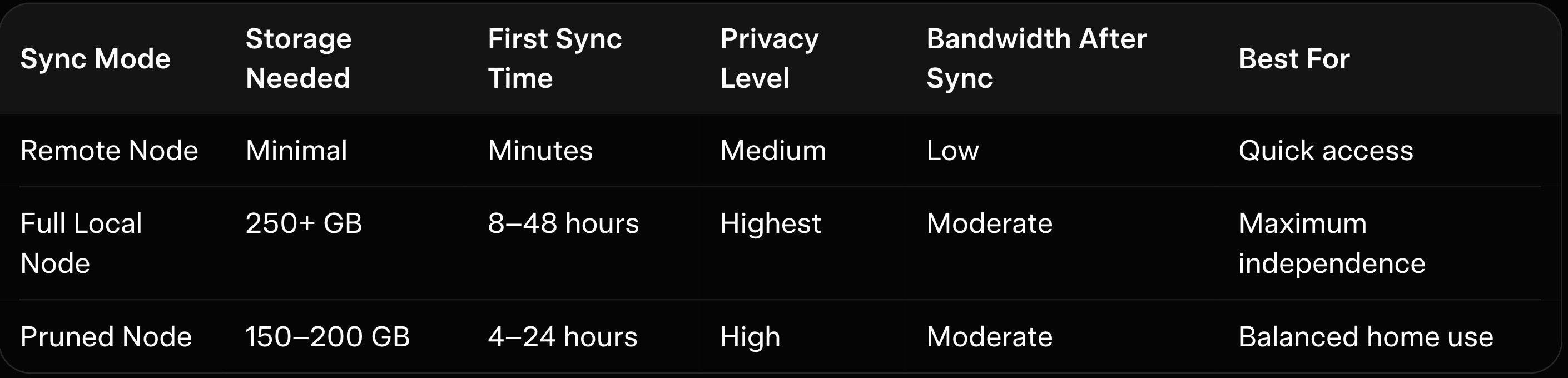
Enter your 25-word seed phrase exactly as written (case-sensitive, in the correct order). The wallet will automatically detect the restore height if you provide it (the block height when your wallet was first used). If you don’t know the height, leave it at 0—the wallet will scan from the genesis block, which takes longer but is completely safe. Choose your synchronization mode: remote node for speed or local node for maximum privacy. Set a strong password for the wallet file. The wallet will begin synchronizing and display your balance once complete.
Step-by-Step: Restoring with the Monero CLI Wallet
The CLI Wallet is lighter and preferred by advanced users. Download the official CLI tools from getmonero.org and extract them. Open a terminal and run the command monero-wallet-cli --restore-deterministic-wallet.
Enter your 25-word seed phrase when prompted. Provide the restore height if known (this significantly speeds up the process). Set a wallet name and password. The CLI will restore the wallet and connect to a remote node or your local daemon. Use the refresh command to start synchronization. Once synced, you can view your balance with balance and send funds with transfer. As explained in our how monero privacy works guide, the CLI gives precise control but requires comfort with the command line.
Understanding Restore Height Logic
The restore height tells the wallet where to start scanning the blockchain. Entering the approximate block height when you first created the wallet (available from explorers or your old transaction history) skips unnecessary old blocks and speeds up synchronization dramatically. If you don’t know the height, set it to 0—the wallet will scan from the beginning. In 2026, this feature saves hours on full-node restores. Always err on the side of a lower height if unsure, as it ensures no transactions are missed. As explained in our FMCP++ upgrade, correct restore height is one of the most practical optimizations.
Here is the restore options table:
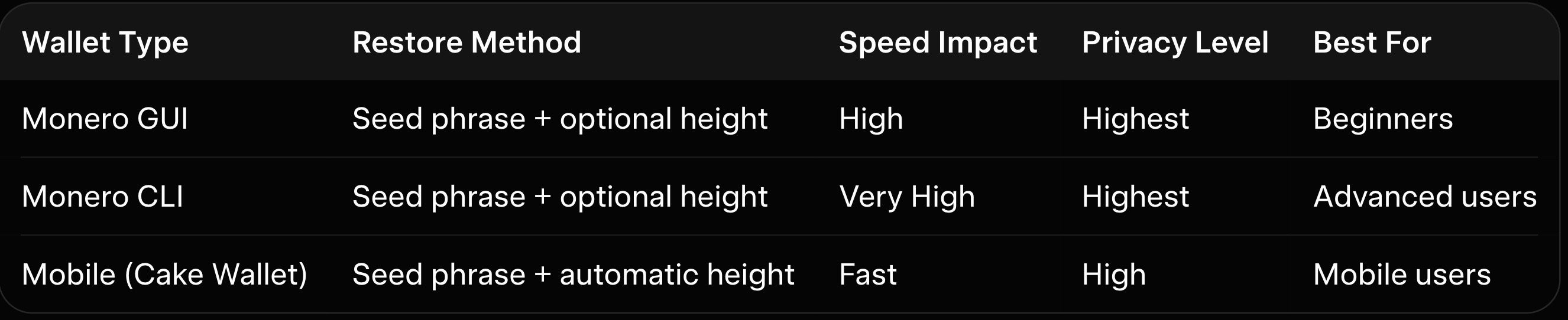
Here is the sync implications table:
Security Precautions During Restoration
Always perform restoration on a clean, trusted device. Never enter your seed phrase on a public or potentially compromised computer. Use a hardware wallet for large balances to keep keys offline during spending. Enable password protection on the restored wallet file. After restoration, generate a fresh subaddress for any new incoming payments to maintain privacy.
Common Recovery Mistakes to Avoid
The most frequent mistake is entering the seed phrase incorrectly or on an online device. Another is skipping the restore height, which wastes hours on unnecessary scanning. Some users forget to back up the wallet file after restoration or use weak passwords. Restoring on multiple devices simultaneously can cause sync conflicts. Always test with a tiny amount first.
How baltex.io Enables Practical XMR Swaps and Liquidity After Restoration
Once your wallet is restored and synced, you will likely need to swap or move XMR for liquidity or spending. baltex.io enables practical XMR swaps and cross-chain liquidity directly from your restored wallet by scanning multiple no-KYC routes and liquidity sources internally. Private Swap mode inserts shielded Monero hops that fully break on-chain links using ring signatures and stealth addresses before delivering clean assets on destination chains. Settlements complete in 8–35 minutes even for cross-chain pairs, fees stay low at ~0.4–0.8%, and there are virtually no limits. Supporting over 10,000 tokens across 200+ networks without manual bridging, baltex.io delivers true one-click optimization after restoration.
Conclusion
Restoring a Monero wallet from a seed phrase in 2026 is a reliable and private process on both the GUI and CLI wallets. The GUI offers visual simplicity, while the CLI provides maximum control. Understanding restore height, sync modes, and security precautions ensures a smooth recovery. Once restored, tools like baltex.io make managing your XMR seamless.
We cover this in more detail in SimpleSwap Review 2026: Pros, Cons, and Monero Exchange Fees.
For more on this, see our guide on Instant Swap Services: The Go-To for Privacy-Conscious Users.
You can read our full breakdown in XMR.to Alternatives: How to Pay Bitcoin Invoices with Monero.
You can read our full breakdown in Zcash (ZEC) vs Monero (XMR): Which Privacy Coin Wins in 2026.