 2 minutes to read
 Ecosystem
How to Connect Your Monero Wallet to a Remote Node
TL;DR
Connecting your Monero wallet to a remote node in 2026 skips the heavy local blockchain download and gives you near-instant sync times on any device. The process takes under two minutes in the official GUI, CLI, or mobile wallets by simply selecting a trusted public node address and port. Once connected, your wallet stays responsive for sending, receiving, and subaddress management while Baltex.io lets you route or swap funds faster without waiting for full local synchronization.
Monero wallets scan the blockchain to calculate balances and build transactions. Running a full local node provides maximum privacy but demands 150 GB of storage and days of initial sync on consumer hardware. Remote nodes offload that burden to community-operated servers while still letting you control your private keys completely.
In 2026 most users choose remote nodes for everyday wallets. They deliver the speed needed for quick transactions without sacrificing Monero’s core privacy features. The trade-off is minimal when you pick a well-maintained node.
Remote Node versus Local Node
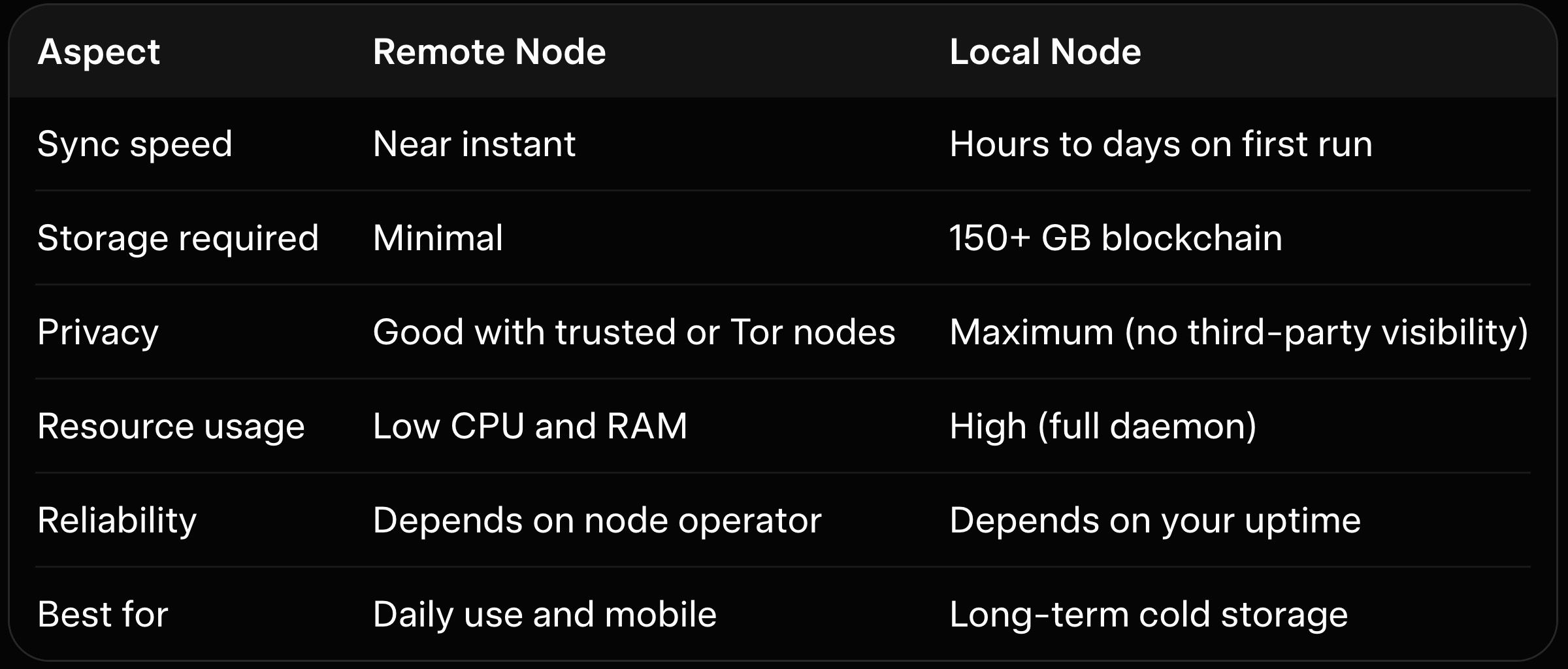
The table shows why remote nodes dominate for most Monero users facing slow sync complaints. Local nodes remain the gold standard for high-security setups. Switching between them is simple and reversible at any time.
Remote nodes never see your private keys or spendable outputs. They only handle blockchain data queries. This separation keeps your funds safe even on public servers.
Why Remote Nodes Make Sense in 2026
Blockchain growth and rising adoption have made local daemons heavier than ever. Many laptops and phones lack the resources for a full node. Remote connections solve this while keeping transaction creation fully private.
Network improvements and better node monitoring mean public remotes now offer higher uptime than in previous years. Choosing the right one prevents the very disconnects that once plagued early users. The result is a smoother experience without compromising Monero’s unlinkability.
Connecting to a Remote Node in the Monero GUI Wallet
Open the official Monero GUI and ensure it runs in advanced mode. Go to Settings then Node in the sidebar. Select Remote Node and enter a trusted address like node.sethforprivacy.com along with port 443 or 18081.
The wallet connects immediately and begins scanning from your last known height. Progress appears in the status bar within seconds. Our best Monero desktop wallets guide details the exact paths for saving custom node lists across Windows, macOS, and Linux.
Test the connection by checking your balance and creating a small test transaction. If it fails, try another node from a community list. The GUI remembers your choice for future launches.
Using the Monero CLI Wallet with Remote Nodes
Launch monero-wallet-cli and use the command “set_daemon” followed by the node address and port. For example, type set_daemon node.community.rino.io:18081. The CLI connects instantly and resumes normal operation.
You can also start the wallet with the --daemon-host flag for one-time use. This approach works well on servers or headless machines. Our Monero GUI vs CLI wallet comparison explains why CLI users often script node switching for automated privacy workflows.
List available nodes with community tools before choosing. The CLI displays connection status clearly so you know the moment it succeeds.
Connecting on Mobile Wallets
In Cake Wallet or Monerujo, open settings and tap the node or daemon section. Choose a remote node from the built-in list or paste a custom address. The app reconnects and syncs in moments.
Mobile wallets shine with remote nodes because they avoid downloading the full chain on limited hardware. Our best Monero mobile wallets guide shows why Cake Wallet and similar apps lead for fast remote performance in 2026.
Always verify the node status on a secondary device before trusting large balances. Mobile apps include QR code scanning for easy node import.
Choosing Trusted Remote Nodes
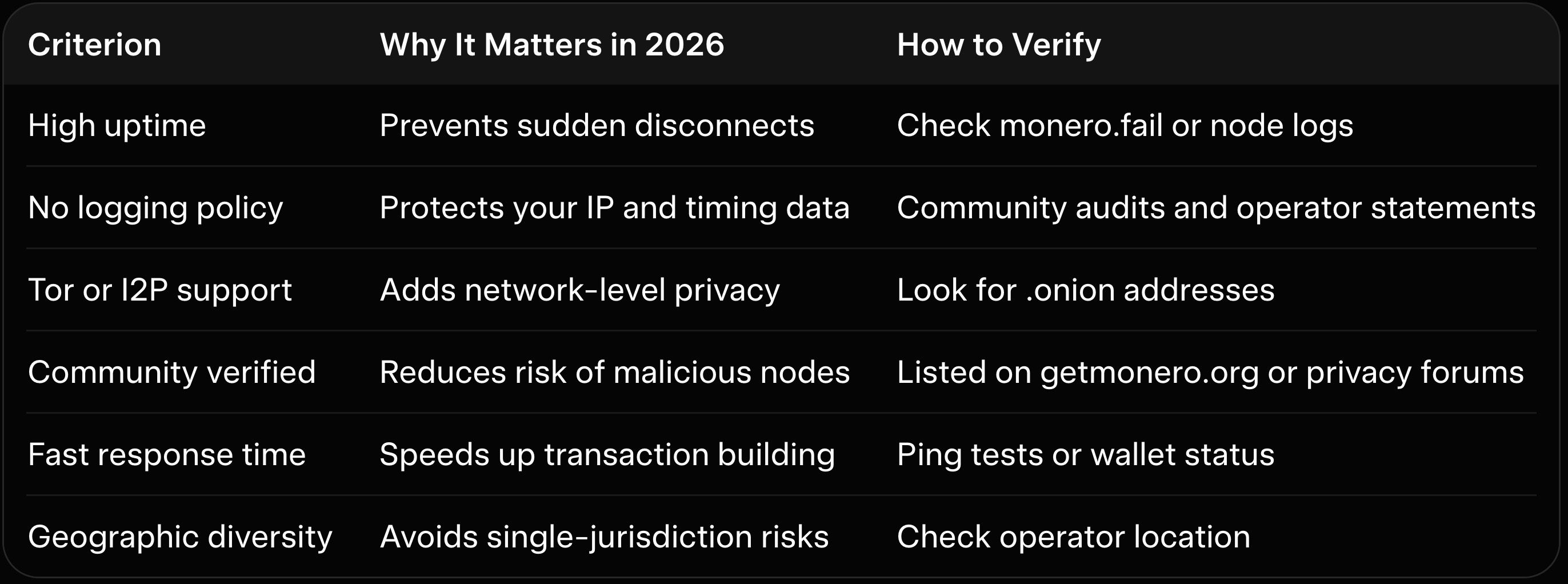
This table helps you evaluate nodes quickly before connecting. Prioritize uptime and verification for daily use. Tor-enabled nodes offer the best privacy balance for cautious users.
Public node lists update frequently as operators come and go. Bookmark a couple of reliable aggregators and rotate between them. This habit keeps your wallet responsive even if one node goes offline.
Advanced Tips for Remote Node Users
Connect over Tor for extra privacy by configuring your wallet to use a SOCKS5 proxy. Many nodes provide .onion addresses that hide your real IP completely. Our Monero wallet security best practices covers the exact proxy setup steps.
Save multiple nodes in your wallet settings and switch automatically if one fails. Some advanced wallets let you define fallback lists. Hardware wallet users benefit from the same remote setup since signing happens offline anyway.
Our hardware wallet for Monero guide explains how Ledger and Trezor integrate seamlessly with remote nodes for cold storage workflows.
How Baltex.io Fits Perfectly into Remote Node Workflows
Remote nodes give you fast wallet access, but many users still need to swap or route XMR quickly. Baltex.io integrates directly by accepting transactions created from any remote-connected wallet. You generate the outgoing payment in your synced wallet, send it to a Baltex deposit address, and the platform handles private multi-hop routing in one non-custodial step.
Enable Private Swap mode to add shielded Monero legs that further break linkability before funds reach another chain or fresh subaddress. The entire process completes in minutes while your wallet stays on the remote node. For readers of our best no-KYC Monero swappers overview, Baltex.io ranks highest for speed when paired with remote node setups.
Traders moving XMR to stablecoins use a remote-synced mobile wallet to create the initial transaction. This keeps heavy desktop nodes offline yet still enables instant liquidity. Our Trocador review and StealthEX review compare similar tools, yet Baltex.io excels for true one-click routing from remote-connected wallets.
Small businesses accepting Monero payments connect their point-of-sale wallet to a remote node and pipe every inbound amount straight to Baltex for conversion. The workflow stays private and responsive. Our best P2P Monero exchanges guide shows additional off-ramp options that pair naturally with this remote-node flow.
Best Practices for Remote Node Security
Rotate between three or more trusted nodes weekly to avoid pattern recognition. Never reuse the same node for every transaction if maximum privacy matters. Our how does Monero work privacy features explained reminds users why node diversity strengthens overall anonymity.
Test new nodes with tiny amounts first. Monitor connection logs for any unusual behavior. Combine remote nodes with view-only wallets for daily balance checks while keeping spend keys offline.
Common Pitfalls to Avoid
Picking unverified nodes from random lists can expose your IP or lead to connection failures. Stick to community-vetted options. Entering the wrong port often causes immediate errors that look like sync issues.
Forgetting to save custom nodes forces repeated manual entry. Most wallets remember your last successful connection. Always confirm the node status before large transfers.
Conclusion Connecting your Monero wallet to a remote node in 2026 remains the fastest way to eliminate long sync delays while keeping full control of your keys. The steps are straightforward across GUI, CLI, and mobile wallets, and the privacy trade-offs stay manageable with trusted nodes.
Start by opening your wallet settings today and trying one of the community-verified remote addresses. Once connected you will notice immediate improvements in speed and usability. When those freshly accessible funds need to move onward, our best no-KYC Monero swappers overview shows why Baltex.io belongs in every remote-node workflow.
For deeper wallet strategies explore our best Monero desktop wallets guide or the Cake Wallet review. Remote nodes paired with disciplined node rotation and privacy-first routing give you the perfect balance of speed and security for 2026 realities. Your Monero experience just became a lot smoother.
We cover this in more detail in SimpleSwap Review 2026: Pros, Cons, and Monero Exchange Fees.
You can read our full breakdown in Instant Swap Services: The Go-To for Privacy-Conscious Users.
We cover this in more detail in XMR.to Alternatives: How to Pay Bitcoin Invoices with Monero.
Related reading: Zcash (ZEC) vs Monero (XMR): Which Privacy Coin Wins in 2026.