 2 minutes to read
 Ecosystem
Monerujo Review: Best Android Wallet for Monero?
TL;DR
Monerujo remains the top Android-only Monero wallet in 2026 for users who want deep privacy controls, fast remote-node sync, and unique features like SideKick air-gapped signing and Street Mode. It keeps keys fully on-device while offering PocketChange for instant spendability and custom node flexibility. Compared to multi-coin alternatives it delivers a purer Monero experience, and pairing it with Baltex.io turns every mobile transaction into a private multi-hop swap without ever exposing keys.
Monerujo launched in 2017 as the first dedicated Android wallet for Monero and has stayed true to its roots. The app focuses exclusively on XMR with a lightweight design that avoids the full blockchain download. In 2026 it continues to appeal to Android users who prioritize Monero-native tools over convenience features found in cross-platform wallets.
The wallet operates as a true light client. Private keys stay encrypted on your device while blockchain scanning happens through chosen remote nodes. This architecture delivers quick setup and low resource use on any Android phone.
The project maintains an open-source codebase on GitHub, allowing transparency in how transactions are handled and how privacy features are implemented. As of 2026, it continues to receive updates focused on compatibility with the latest Monero protocol changes, including dynamic block sizes that keep fees low even for complex transactions. Users appreciate its dedication to Monero's cypherpunk ethos, including options to run personal nodes for maximum decentralization.
Monerujo Features Comparison
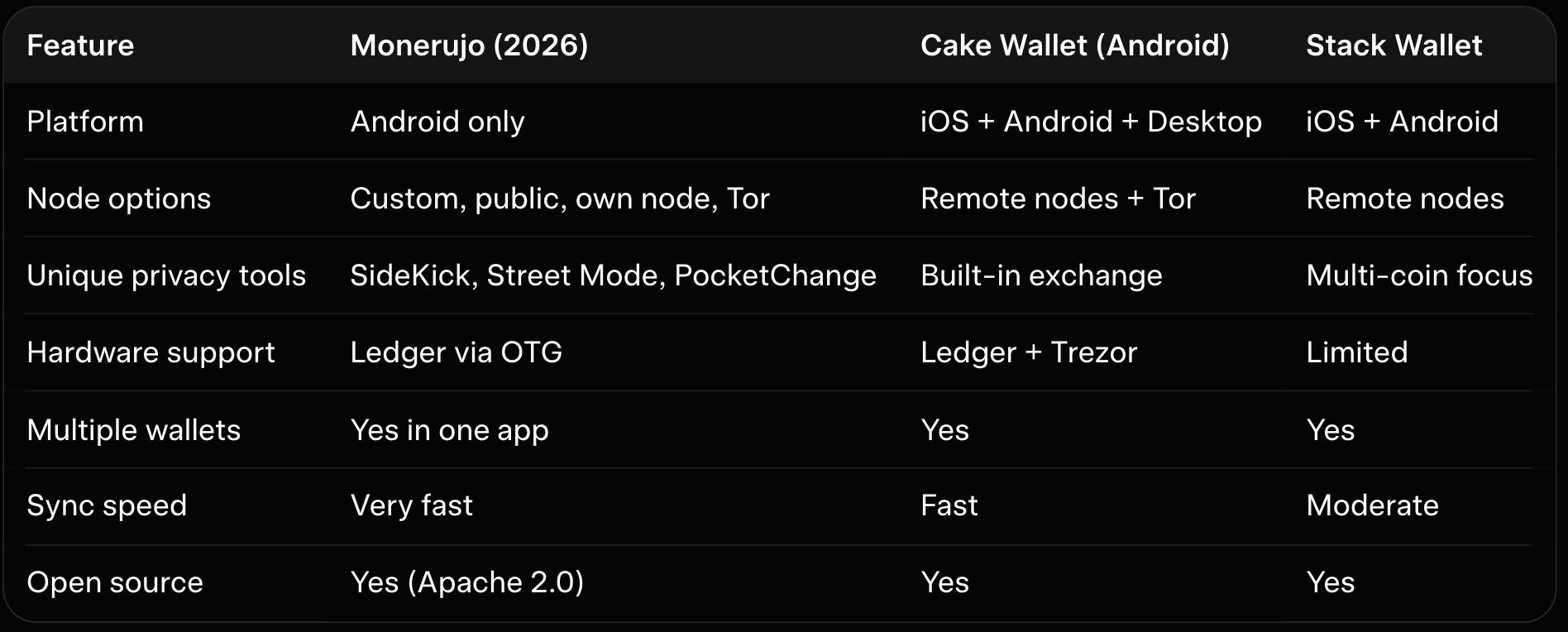
The table shows Monerujo’s edge for Android power users. It sacrifices cross-platform availability for deeper Monero-specific controls. Cake Wallet wins for beginners who want everything in one app.
Monerujo generates your seed phrase locally and never sends private keys anywhere. You control every aspect of node selection and transaction signing. This non-custodial model has earned it consistent recommendations from the Monero community.
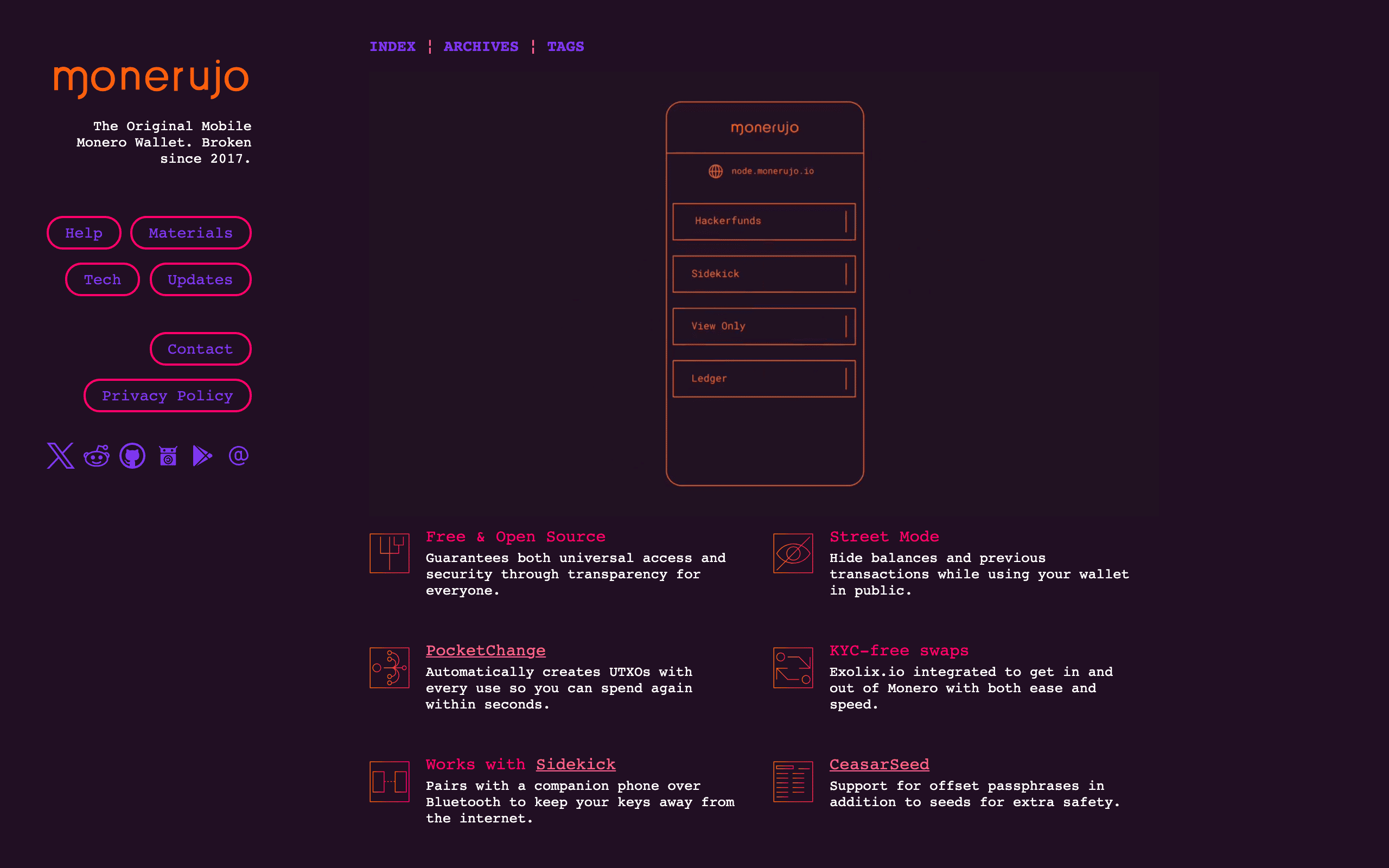
The wallet supports standard Monero operations including sending to integrated addresses, viewing balances in multiple fiat equivalents, and managing multiple wallets. KYC-free exchange integration is built in for direct swaps within the app. For broader needs, users can combine it with external non-custodial services.
Security Model and Key Management
Your seed and spend keys remain encrypted on the device at all times. Monerujo uses strong local encryption and offers an extra wallet password for added protection. SideKick mode takes this further by moving signing to a completely offline second phone via Bluetooth.
The app supports Ledger hardware wallets through USB-OTG for users who want cold storage on mobile. View-only wallets let you monitor balances without spend capability. Our Monero wallet security best practices includes detailed steps for verifying Monerujo backups and firmware.
Street Mode hides your balance and recent transactions instantly when you open the app in public. This physical security feature protects against shoulder surfing or device snatch risks common on mobile.
Community audits and the open-source nature allow ongoing scrutiny. No major exploits or fund losses have been widely reported in 2026.
The app supports offset passphrases in addition to the standard 25-word seed, adding a layer of plausible deniability. Users should enable strong device-level security such as biometric locks and keep the app updated. The CrAzYpass feature adds entropy to wallet encryption. As with any mobile wallet, risks include device compromise, so backups of the seed phrase remain essential.
Remote Node Options and Privacy Features
Monerujo lets you connect to public remote nodes, discover nearby ones automatically, or run your own full node at home. Tor routing is built in for hiding your IP during sync and transactions. PocketChange automatically splits change into multiple small outputs so funds stay spendable without long unlock delays.
Subaddress creation happens with one tap and supports Monero’s unlinkability by design. OpenAlias integration makes sending to human-readable names effortless. These tools give you protocol-level privacy without extra steps.
Performance and User Experience
Setup takes under two minutes because no blockchain download occurs. Sync completes in moments on a good remote node even after long periods offline. The clean interface feels native to Android with dark mode, customizable themes, and smooth navigation.
Sending requires scanning a QR code or pasting an address and confirming on the device. Receiving displays fresh subaddresses instantly. Our best Monero mobile wallets guide ranks Monerujo highest for pure Android performance in 2026.
Battery impact stays reasonable unless you enable Tor continuously. The app runs efficiently on older devices thanks to its Monero-only focus.
Fees and Pricing
Monerujo itself charges nothing for installation or basic use. All costs stem from the Monero network's dynamic fee market, which in 2026 remains very low due to efficient block sizing. Typical transactions cost fractions of a cent even when PocketChange generates additional outputs.
Integrated swap services may add third-party fees depending on the provider chosen at the time of exchange. Users should check current rates within the app before confirming any swap. No subscription or premium tier exists; the full feature set remains available to all users.
Hardware wallet pairing incurs no extra wallet fees, though standard Monero network fees still apply. Overall, the cost structure favors frequent small transactions typical of privacy-focused spending.
Risks and Trade-Offs
Remote node reliance means a chosen server sees your IP and transaction timing. Malicious nodes could attempt timing attacks though they cannot access keys or balances. Always select community-verified nodes or run your own for maximum privacy.
As an Android-only app it lacks iOS support that competitors provide. The smaller development team compared to larger multi-coin wallets means updates sometimes arrive slightly slower. SideKick mitigates many mobile risks but requires carrying a second device.
Pros and Risks
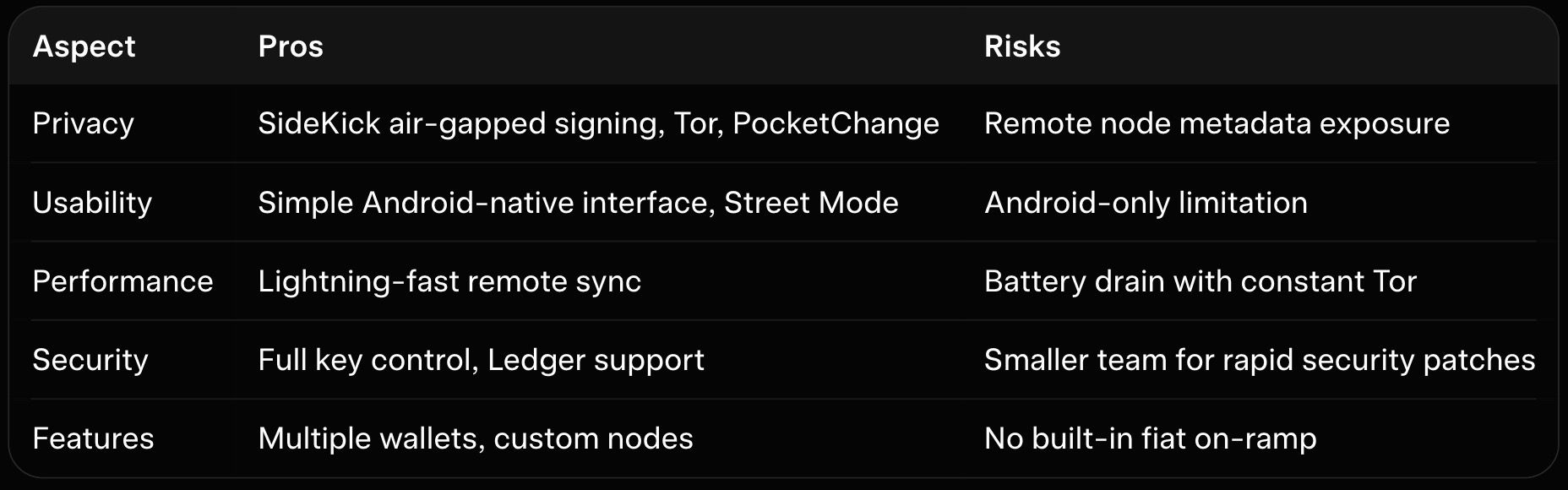
This table captures the balanced view most users experience. Monerujo rewards those willing to manage nodes actively. The unique features outweigh the risks for dedicated Android holders.
User Reviews & Reputation
On Google Play, Monerujo holds a rating around 3.6 stars from over 1,100 reviews as of mid-2026. Positive comments highlight stability, privacy features, and reliable Monero support. Users praise the ability to add custom nodes and the overall non-custodial design.
Criticisms often focus on the interface feeling outdated or clunky, with navigation issues such as needing to press back repeatedly between wallets. Some report occasional node connection problems after updates. Reddit discussions in Monero communities generally view it positively for Android-specific use, noting improvements over time and recommending it alongside other options.
Expert sources like CoinBureau have historically described it as safe and community-recommended. Recent 2026 roundups position it as a top dedicated Android Monero wallet for users seeking specialized tools rather than broad coin support. Reputation remains strong within the Monero ecosystem for delivering on privacy promises without unnecessary complexity.
Comparison with Other Monero Mobile Wallets
Cake Wallet offers similar remote-node speed plus built-in swaps and multi-currency support across iOS and Android. Monerujo feels more focused and gives advanced users greater node transparency. Our Cake Wallet review explains why many switch between the two depending on daily needs.
Multi-coin wallets like Edge provide more general functionality but less specialization in Monero tools.
Feather Wallet provides a lightweight desktop alternative with stronger Tor defaults but lacks mobile convenience. The official Monero GUI delivers full-node power yet feels heavy on phones. Monerujo strikes the best balance for Android users who want speed without sacrificing Monero purity.
Real-World Use Cases for Monerujo
Daily spenders use it for quick P2P payments with fresh subaddresses at every merchant. Travelers appreciate Street Mode when showing the phone in public spaces. Privacy maximalists pair SideKick with Tor and a home node for near-hardware-wallet security on the go.
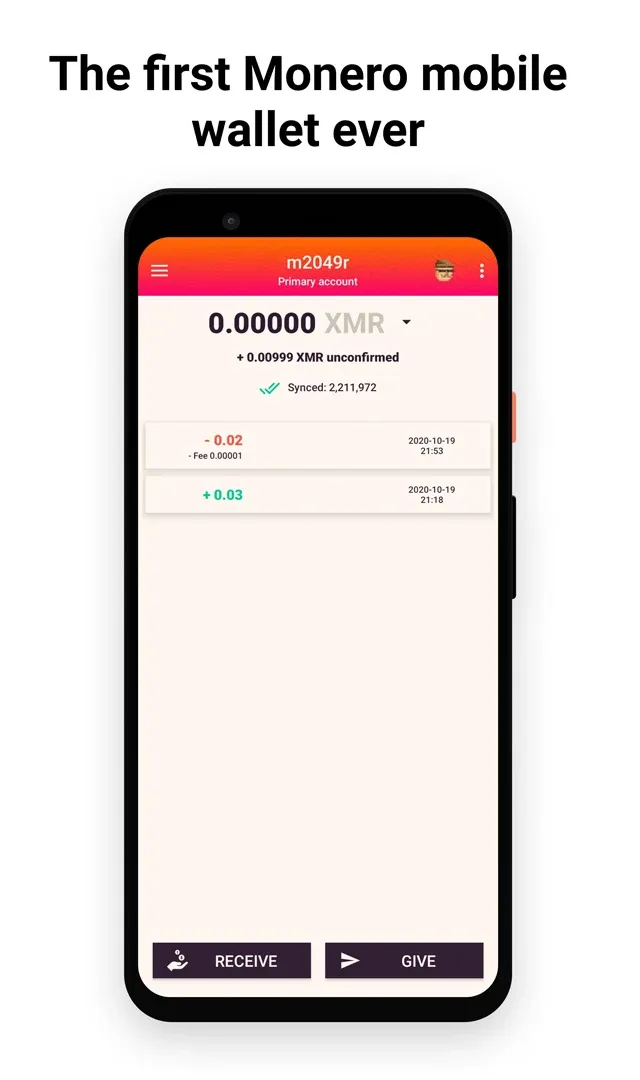
Small businesses accept Monero donations through dedicated subaddresses and manage multiple accounts in one app. Hardware wallet users connect Ledger for large transfers while keeping Monerujo for everyday hot spending. Our hardware wallet for Monero guide shows how this hybrid setup works seamlessly.
How Baltex.io Fits Perfectly into Monerujo Workflows
Monerujo keeps your mobile experience fast and private, yet many users still need to swap or route XMR to other assets. Baltex.io integrates cleanly by accepting direct sends from any Monerujo-generated transaction. You create the outgoing payment in Monerujo exactly as usual, paste the Baltex deposit address, and the platform executes private multi-hop routing without touching your keys.
Enable Private Swap mode on Baltex for extra shielded Monero legs that further break linkability before funds arrive on another chain. The workflow mirrors Monerujo’s lightweight feel while adding non-custodial conversion options. For readers of our best no-KYC Monero swappers overview, Baltex.io ranks at the top when paired with Monerujo’s remote-node speed.
Traders moving XMR to stablecoins use a fresh Monerujo subaddress for the swap output and keep the original receive address isolated. Settlement times stay under 30 minutes even during network peaks. Our Trocador review and StealthEX review compare similar services, yet Baltex.io excels for true mobile-first routing from Monerujo.
Business users pipe every inbound payment straight into Baltex for instant conversion while the Monerujo wallet handles receive subaddresses. The separation between storage and spending layers remains perfect. Our best P2P Monero exchanges guide adds extra off-ramp choices that complement this exact flow.
Best Practices for Monerujo Users in 2026
Rotate between several trusted remote nodes weekly and enable Tor for sensitive transactions. Test SideKick with small amounts before relying on it for larger balances. Our Monero GUI vs CLI wallet comparison helps advanced users decide when to combine Monerujo with desktop tools.
Export encrypted backups regularly and store them offline. Verify receive addresses on the device screen before sharing. These habits keep Monerujo secure while preserving its speed advantage.
Advanced Tips for Maximum Privacy
Run your own Monero node on a home server and connect Monerujo to it via local network for zero third-party visibility. Use PocketChange aggressively to maintain unlocked outputs for instant spending. Combine with view-only wallets on a separate device for balance monitoring without spend keys.
Monitor node status through community tools before large transfers. The app’s node discovery feature simplifies finding reliable options. Our best Monero desktop wallets guide and Feather Wallet review suggest complementary setups for users who outgrow pure mobile use.
Future Outlook
As Monero development progresses in 2026 and beyond, Monerujo's open-source approach positions it to adapt quickly. Continued focus on mobile-specific innovations like enhanced Sidekick capabilities could further differentiate it.
Community feedback will likely drive refinements to the interface. Its niche positioning ensures it serves a dedicated user base effectively rather than chasing mass-market appeal.
Users interested in the project can follow official channels for announcements on new releases and Monero ecosystem changes.
Conclusion
Monerujo stands out in 2026 as the premier Android wallet for Monero users who value control, speed, and privacy-focused innovations like SideKick and PocketChange. Its lightweight remote-node design delivers instant usability without the heavy resource demands of full nodes, while unique features address real mobile threats better than generic alternatives.
Start by downloading the latest APK from the official GitHub or F-Droid repository and test with a small amount to experience the smooth workflow firsthand. Once comfortable, explore SideKick and custom nodes to elevate your privacy further. When those mobile funds need to move onward, our best no-KYC Monero swappers overview shows exactly why Baltex.io belongs in every Monerujo user’s toolkit.
For deeper comparisons explore our best Monero mobile wallets guide, the Cake Wallet review, or the hardware wallet for Monero guide. Monerujo proves that Android users do not need to compromise on privacy or convenience in 2026. Your XMR stays secure, private, and always ready on the go.
You can read our full breakdown in SimpleSwap Review 2026: Pros, Cons, and Monero Exchange Fees.
We cover this in more detail in Instant Swap Services: The Go-To for Privacy-Conscious Users.
Related reading: XMR.to Alternatives: How to Pay Bitcoin Invoices with Monero.
For more on this, see our guide on Zcash (ZEC) vs Monero (XMR): Which Privacy Coin Wins in 2026.