 1 minute to read
 Ecosystem
How to Set Up a Monero Wallet: Step-by-Step Guide in 2026
TLDR Setting up a Monero (XMR) wallet in 2026 is simple, secure, and fully non-custodial. Choose the official Monero GUI for desktop (maximum control), Cake Wallet for mobile (best balance of usability and privacy), or Monerujo for Android. The process involves downloading from official sources, creating a new wallet, securely backing up the 25-word seed phrase, and selecting a synchronization mode (remote node for speed or local node for maximum privacy). Once set up, you can send/receive XMR with full anonymity and negligible fees. For practical swaps and cross-chain liquidity after setup without KYC, baltex.io enables shielded routing—see our complete Monero XMR guide and best no-KYC Monero swappers guides. Overall, the official GUI or Cake Wallet provides the safest and most private experience for beginners in 2026.
Monero (XMR) is the leading privacy coin in 2026 because its protocol enforces anonymity through ring signatures, stealth addresses, and RingCT, making every transaction unlinkable and untraceable. Setting up your own Monero wallet is the essential first step to owning and using XMR privately. Unlike custodial services, a self-custodial wallet gives you full control over your keys and ensures no third party can access your funds. This guide walks you through every step of setting up a Monero wallet in 2026, compares wallet types, explains seed backup practices, node synchronization options, basic transaction flows, and usability trade-offs. It also shows how to connect your new wallet to liquidity tools for seamless swaps and cross-chain use.
Choosing the Right Monero Wallet Type
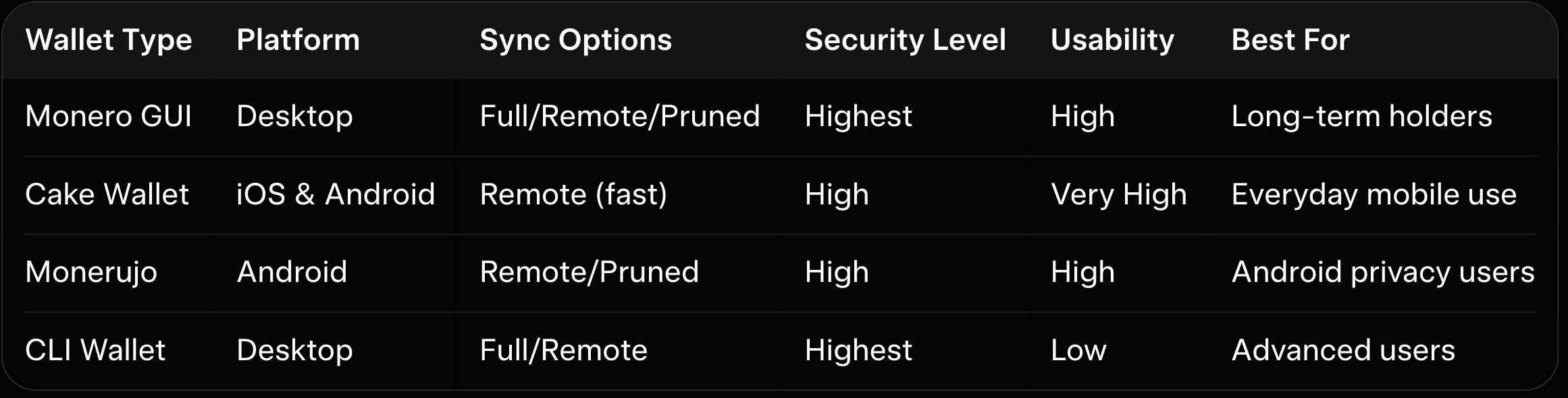
In 2026, Monero offers three main wallet categories: desktop (official GUI), mobile (Cake Wallet or Monerujo), and command-line (CLI). The official Monero GUI Wallet is the most secure for desktop users because it supports full local node operation and is developed directly by the Monero team. Cake Wallet is the best mobile choice for both iOS and Android, offering a clean interface, fast remote node sync, and built-in no-KYC swaps. Monerujo is a strong Android-only option for users who want lightweight design and advanced privacy controls. The CLI wallet is powerful for advanced users but lacks a graphical interface. As explained in our crypto wallet setup guide, choose based on your device and privacy priorities—GUI or Cake Wallet for most beginners.
Step-by-Step Installation and Wallet Creation
Start by visiting the official getmonero.org website and downloading the latest Monero GUI for your operating system. Verify the cryptographic signatures to ensure the file is authentic. Install the software and launch it. On first run, choose "Create a new wallet." The wallet generates a 25-word seed phrase—write it down on paper or metal backup and store it offline in a safe place. Never store the seed digitally or share it. After confirming the seed, set a strong password for the wallet file. The process takes less than five minutes. As explained in our complete Monero XMR guide, proper seed backup is the single most important security step.
For mobile, download Cake Wallet from the official App Store or Google Play. Open the app, select "Create new wallet," and follow the same seed phrase backup process. Both desktop and mobile setups are non-custodial—your keys never leave your device.
Node Synchronization Modes
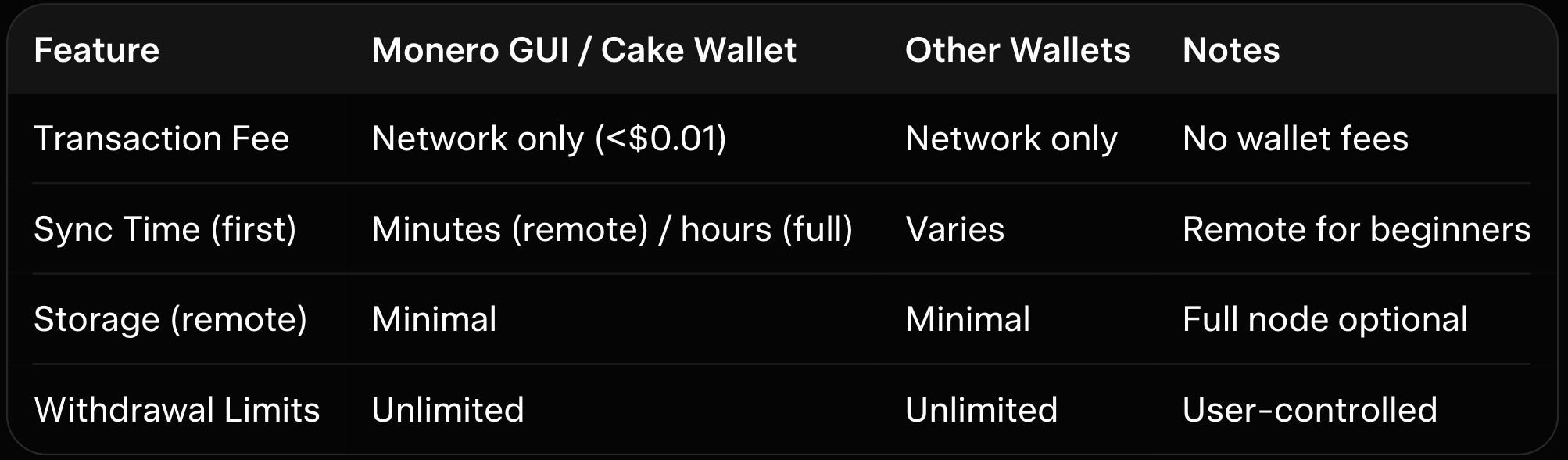
After wallet creation, choose a synchronization mode. Remote node is fastest: the wallet connects to community servers and syncs in minutes, using minimal storage. This is ideal for mobile users and beginners. Full local node downloads and verifies the entire blockchain (over 100 GB in 2026), providing maximum privacy and security because you control all data. Sync time is 8–48 hours on first run but much faster afterward. Pruned nodes reduce storage to 30–40 GB while retaining strong security. As explained in our Monero privacy features explained, remote nodes offer convenience while local nodes maximize privacy.
Basic Transaction Workflows
Sending XMR is simple. Click "Send," enter the recipient's address (or scan a QR code), input the amount, and optionally add a payment ID or note. Review the stealth address and confirm. Receiving uses a fresh subaddress for each transaction to maintain privacy. Fees are network-only and usually under $0.01. As explained in our Monero FCMP++ upgrade guide, subaddresses are a key privacy tool in daily use.
Here is the wallet type comparison table:
Here is a feature and limits context table (2026 averages):
How baltex.io Enables Practical XMR Swaps and Cross-Chain Liquidity
Once your wallet is set up, you will likely need to swap or move XMR for liquidity or payments. baltex.io enables practical XMR swaps and cross-chain liquidity directly from your new wallet by scanning multiple no-KYC routes and liquidity sources internally. Private Swap mode inserts shielded Monero hops that fully break on-chain links using ring signatures and stealth addresses before delivering clean assets on destination chains. Settlements complete in 8–35 minutes even for cross-chain pairs, fees stay low at ~0.4–0.8%, and there are virtually no limits. Supporting over 10,000 tokens across 200+ networks without manual bridging, baltex.io delivers true one-click optimization after wallet setup.
New Monero users benefit enormously—especially when pairing with tools covered in our best no-KYC Monero swappers and how to swap USDT to XMR privately. Use your new wallet for secure storage and switch to baltex.io when liquidity or cross-chain moves are needed.
Conclusion
Setting up a Monero wallet in 2026 is quick, secure, and fully private when following the official steps. Choose the Monero GUI for desktop power users or Cake Wallet for mobile convenience. Proper seed backup, node choice, and basic transaction practices ensure you maintain full control and anonymity. Once set up, tools like baltex.io make liquidity management seamless.
Always verify downloads, store your seed offline, and start with small test transactions. Explore more strategies in our complete Monero XMR guide, Monero privacy features explained, and best no-KYC Monero swappers guides to use your new wallet effectively.
Related reading: SimpleSwap Review 2026: Pros, Cons, and Monero Exchange Fees.
We cover this in more detail in Instant Swap Services: The Go-To for Privacy-Conscious Users.
We cover this in more detail in XMR.to Alternatives: How to Pay Bitcoin Invoices with Monero.
We cover this in more detail in Zcash (ZEC) vs Monero (XMR): Which Privacy Coin Wins in 2026.