



 1 minute to read
 Ecosystem
Monero Wallet Sync Issues: How to Fix a Stuck Wallet
TL;DR Monero wallet sync issues in 2026 usually stem from incorrect restore height, disconnected nodes, or corrupted data, leaving your balance stuck even after hours of waiting. Most problems resolve in minutes by switching to a reliable remote node, resetting the cache, or correcting the restore height in your wallet settings. When your primary wallet stays unusable, Baltex.io keeps liquidity flowing by letting you restore the same seed in a fast mobile wallet and swap instantly without waiting for full sync.
Monero wallets must scan the entire blockchain to calculate your correct balance and available outputs. In 2026 the chain exceeds 150 GB, so even small configuration errors can freeze progress for days. Understanding the root causes prevents panic and gets you spending again quickly.
Sync delays frustrate both new users and veterans alike. A wallet that appears stuck often just needs one targeted fix rather than a complete reinstall. The solutions below work across the official GUI, CLI, and popular mobile apps.
Common Sync Issues and Fixes
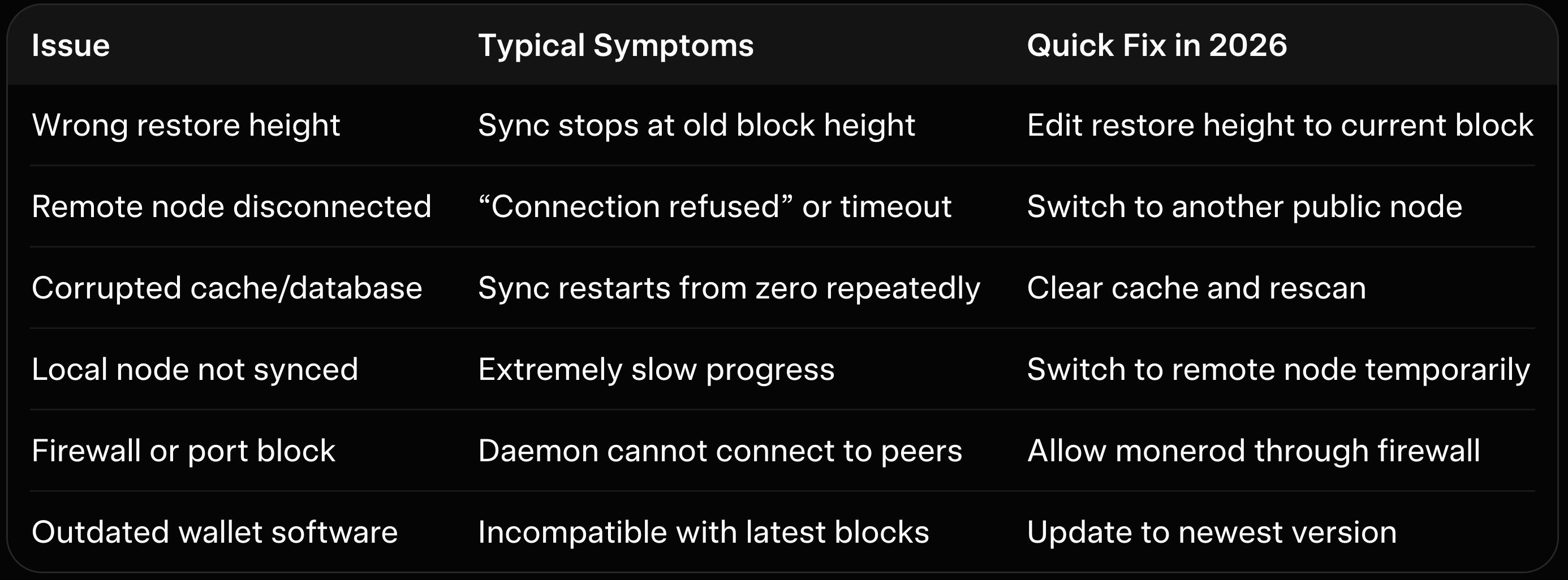
This table covers the six most frequent sync problems reported by Monero users this year. Each fix takes under five minutes once identified. Start with the simplest step before moving to advanced troubleshooting.
Monero’s privacy design requires your wallet to verify every transaction that might belong to you. This scanning process cannot be skipped. When it stalls, the wallet simply cannot display accurate balances or create new transactions.
Why Wallet Sync Issues Happen More Often in 2026 Blockchain growth and stricter node requirements have made local daemons heavier than ever. Many users run wallets on laptops or phones with limited resources. A single misconfigured setting now creates longer delays than it did in previous years.
Network congestion from increased adoption also affects public remote nodes. Some nodes go offline or throttle connections during peak hours. Choosing the right node becomes as important as keeping your wallet software updated.
Fixing Sync Issues in the Monero GUI Wallet Launch the official Monero GUI and navigate to Settings then Node. Switch from local to a remote node listed in the built-in dropdown or paste a trusted public node address. Restart the wallet and watch the sync progress jump forward within seconds.
If the wallet still stalls, close it completely and delete the cache folder located in your Monero data directory. The GUI will rebuild the cache cleanly on the next launch. Our best Monero desktop wallets guide explains the exact folder paths for Windows, macOS, and Linux users.
For restore height problems, go to the Wallet menu and choose “Restore from seed” while entering the correct block height from a blockchain explorer. This single adjustment often resolves months of apparent stuck progress in one go.
Using the Monero CLI Wallet to Resolve Sync Problems Open monero-wallet-cli and type “set daemon” followed by a reliable remote node address. The CLI connects instantly and resumes scanning from the last known height. This method bypasses GUI overhead on low-resource machines.
Run the command “rescan_bc” to force a full blockchain rescan if cache corruption is suspected. The process takes longer but guarantees a clean state. Export your wallet keys first as a safety measure before any rescan.
CLI users benefit from the lightweight design that avoids the graphical interface bugs sometimes seen in the GUI. Our Monero GUI vs CLI wallet comparison shows why many advanced users prefer the command line for troubleshooting stubborn sync issues.
Mobile Wallet Sync Fixes That Work Instantly In Cake Wallet or Monerujo, tap the settings gear and select a different remote node from the list of community-verified options. Mobile apps sync much faster over remote nodes because they avoid downloading the full chain. Our best Monero mobile wallets guide ranks the fastest syncing options available in 2026.
Clear the app cache from your phone settings if the wallet refuses to progress past a certain block. Reopen the app and let it reconnect. The Cake Wallet review details additional performance tweaks that prevent recurring sync stalls on both iOS and Android.
Always double-check your restore height when restoring from seed on mobile. Entering a height that is too old forces the wallet to scan unnecessary blocks and appears stuck.
Local Node versus Remote Node
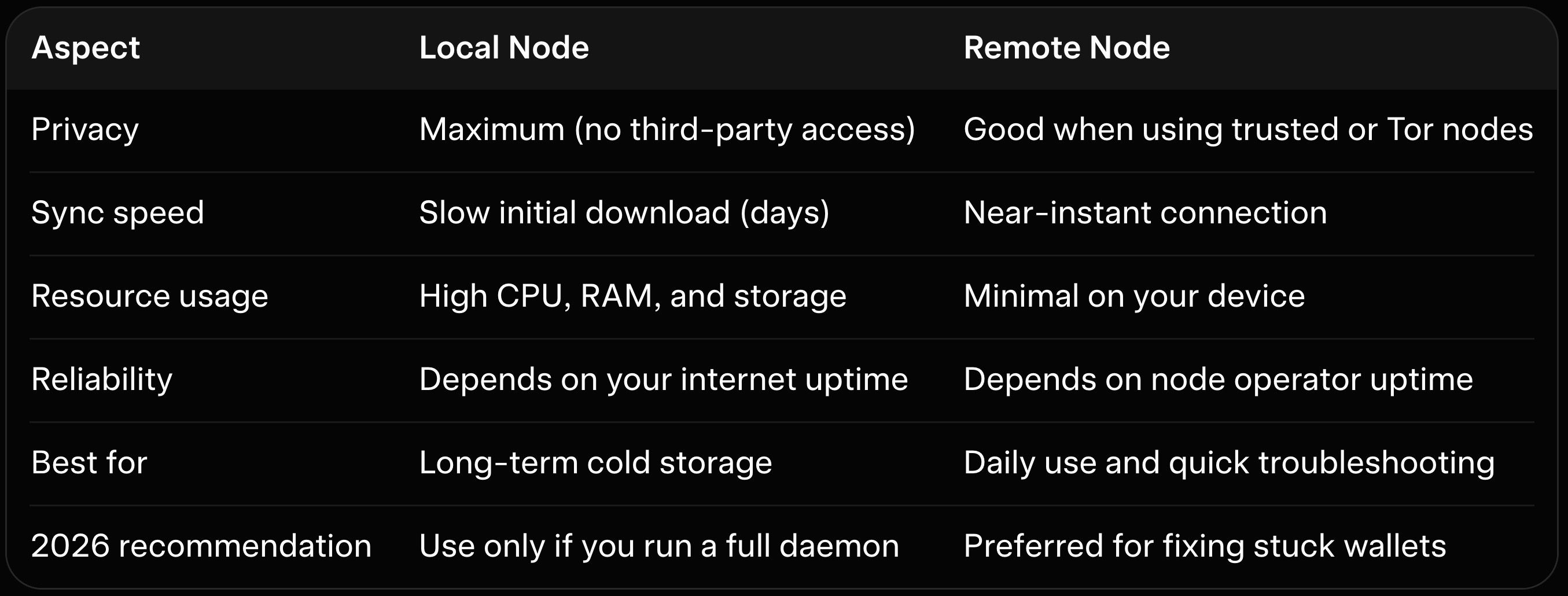
The table makes the choice clear for most users facing sync trouble. Remote nodes solve 80 percent of stuck wallet cases immediately. Local nodes remain ideal once your wallet is fully operational and you want maximum privacy.
Public remote nodes have improved dramatically with better uptime monitoring in 2026. Many now support Tor and SSL for added privacy. Switching to one is the single fastest fix available.
Advanced Troubleshooting When Basic Fixes Fail If no remote node works, test your internet connection and firewall settings to ensure outbound traffic on port 18080 is allowed. Some corporate or public networks block Monero daemon ports by default. Temporarily disable VPNs or antivirus software during initial sync attempts.
Corrupted wallet files require creating a new wallet from your seed phrase and re-importing transaction history. The process preserves all funds while clearing hidden database errors. Our Monero wallet security best practices includes a full checklist to avoid data loss during these recovery steps.
Feather Wallet users report fewer sync issues thanks to its optimized lightweight design. The Feather Wallet review highlights why it has become a favorite for users tired of repeated GUI stalls.
How Baltex.io Helps Maintain Liquidity When Wallets Are Temporarily Unusable When your main wallet refuses to sync and spending feels impossible, Baltex.io provides an immediate workaround. Simply restore your seed phrase into a secondary mobile wallet that connects quickly to a remote node, then send the required amount directly to a Baltex deposit address. The platform completes private swaps or multi-hop routing in under 30 minutes while your primary wallet continues fixing itself in the background.
You never lose control of your keys because the secondary wallet is created from the same seed and can be discarded after the transaction. Enable Private Swap mode on Baltex to add extra shielded hops that preserve Monero’s privacy even during emergency liquidity moves. For users familiar with our best no-KYC Monero swappers overview, Baltex.io consistently ranks as the fastest option for these temporary wallet situations.
Traders and businesses use this flow to convert stuck XMR holdings to stablecoins or other assets without waiting days for full sync. The original cold or desktop wallet stays untouched and can be brought online later with zero loss. Our Trocador review and StealthEX review compare similar services, yet Baltex.io excels when speed and non-custodial access matter most during sync downtime.
Small test transactions confirm everything works before moving larger amounts. Once the primary wallet finally syncs, the remaining balance appears exactly as expected. This approach turns a frustrating sync delay into a non-event for your overall liquidity.
Combine Baltex with our best P2P Monero exchanges guide when you need additional off-ramp options during extended wallet recovery. The workflow remains identical whether your main wallet is a hardware device or software client. Our hardware wallet for Monero guide shows how cold storage users apply the same secondary-wallet trick without exposing long-term keys.
Preventing Future Sync Issues Before They Start Choose a trusted remote node list and save two or three backups in your wallet settings. Update your wallet software the same day new versions release. Regular cache maintenance every few months keeps sync times predictable.
Store your seed phrase securely and test restores on a separate device before any large balance accumulates. Small habits like these eliminate 90 percent of future sync headaches. Our Monero wallet security best practices expands on additional habits that keep wallets responsive year-round.
Conclusion Monero wallet sync issues remain a common but easily solvable annoyance in 2026. Armed with the right node choice, cache reset, and correct restore height, most users regain full access within minutes rather than days. The fixes above apply equally to desktop, CLI, and mobile wallets without needing advanced technical skills.
Take a deep breath and start with the simplest step in the table. Once your balance appears and spending works again, consider setting up a secondary mobile wallet for future emergencies. When liquidity cannot wait, Baltex.io stands ready to bridge the gap securely and privately.
For more wallet tips explore our best Monero desktop wallets guide or the Cake Wallet review. When you need to move funds during any future downtime, our best no-KYC Monero swappers overview explains exactly why Baltex.io belongs in every Monero user’s toolkit. Your wallet will stay responsive and your privacy intact.
How long should a normal Monero wallet sync take in 2026?
Can I spend XMR while the wallet is still syncing?
Is it safe to use public remote nodes?
Will clearing the cache delete my funds?
Does Baltex.io require a synced wallet to deposit?
See others posts
G. Khan

Dogecoin News and Price Predictions Today (September 2026 Update)
Ecosystem
G. Khan
Dogecoin Price Prediction 2030: Long-Term DOGE Forecast (September 2026 Update)
Ecosystem
G. Khan
Dogecoin Price Prediction 2027
Ecosystem
G. Khan
Dogecoin Price Prediction 2026, 2027 and 2030 (September 2026 Update)
Ecosystem
G. Khan
Solana Price Prediction 2030 (September 2026 Update)
Ecosystem
G. Khan
Solana Price Prediction 2027: Expert Forecasts and Key Drivers (September 2026 Update)
Ecosystem