
 1 minute to read
 Ecosystem
TL;DR
Monero wallet problems in 2026 most often involve syncing delays, zero balances after restore, failed transactions, or seed management worries. This FAQ guide delivers direct fixes for the 15 most common issues using simple steps that work across GUI, CLI, and mobile wallets. When any problem blocks access, Baltex.io lets you restore the same seed in a secondary wallet and route funds instantly without waiting for full resolution.
Monero wallets handle complex privacy scanning that can create everyday hiccups even for experienced users. Most issues stem from simple configuration errors rather than lost funds or protocol bugs. The answers below solve them quickly so you regain full control fast.
Every Monero user eventually encounters at least one of these problems. Quick troubleshooting prevents small annoyances from becoming stressful outages. The tables and FAQ sections below organize the fixes by frequency and severity.
Common Issues and Fixes
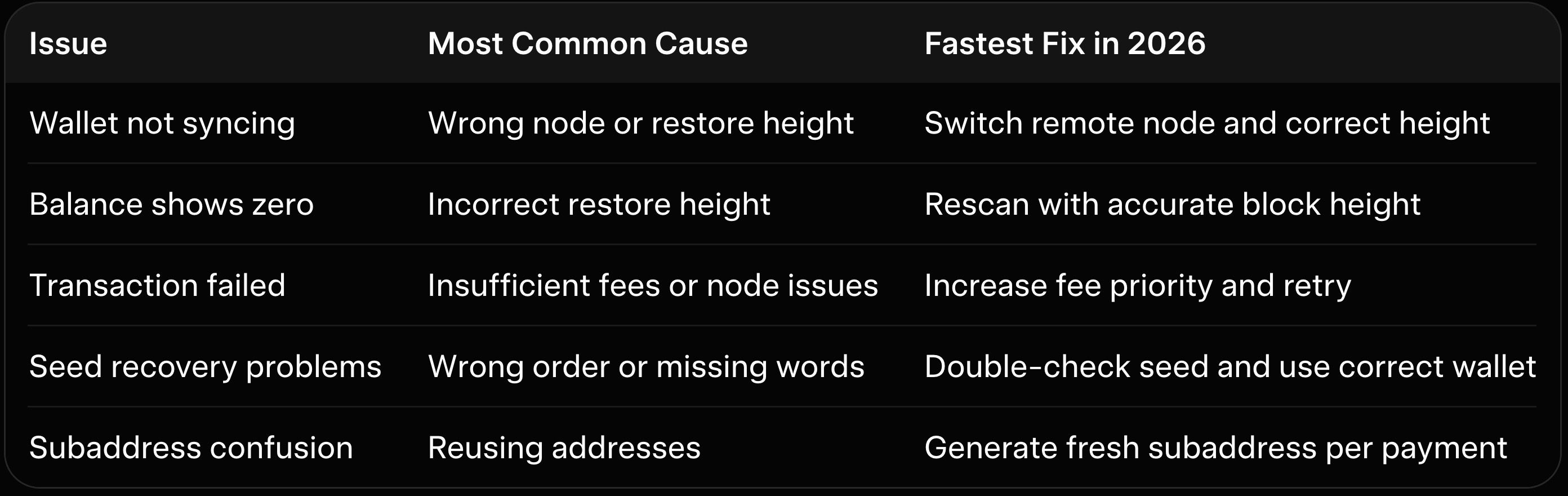
This table covers the top five complaints reported by Monero users this year. Each fix takes under ten minutes in most cases. Start here before diving into detailed answers.
Error Types and Solutions
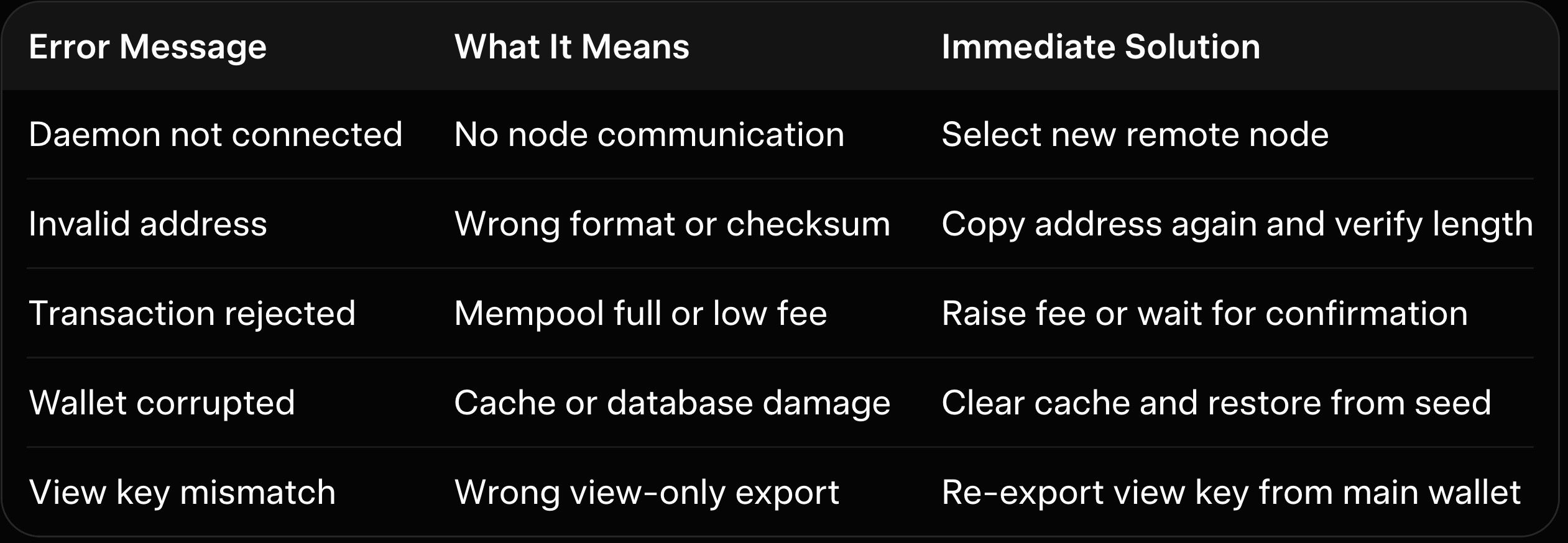
The second table translates cryptic error messages into plain-English fixes. These errors appear across all wallet types but share the same root causes. Refer to it whenever a red warning pops up.
Why Monero Wallet Issues Persist in 2026
Blockchain growth and stricter privacy defaults make small configuration mistakes more noticeable. New users especially struggle with restore heights and node selection. The good news is every problem below has a proven workaround that preserves your funds and privacy.
FAQ: Most Common Monero Wallet Problems Solved
Why is my Monero wallet stuck syncing and showing no progress? Sync stalls usually happen because the wallet uses an outdated or overloaded remote node. Switch to a different public node in settings and ensure the restore height matches the current block height from a blockchain explorer. Our best Monero desktop wallets guide shows the exact menu paths for GUI and CLI users.
Clearing the cache folder forces a clean rescan without losing funds. The process takes minutes on remote nodes. Most users see immediate progress after these two steps.
My balance shows zero after restoring from seed. What went wrong?
The restore height is almost always the culprit when funds disappear after import. Enter the approximate block height from when you first created the wallet. Then trigger a full rescan to recalculate outputs correctly.
Double-check that you restored the primary account rather than a subaddress-only view. Our Monero GUI vs CLI wallet comparison explains the differences in how each interface handles restore heights.
How do I fix a failed or rejected transaction?
Failed sends often result from too-low fees during network congestion. Increase the fee priority to medium or high before resubmitting. The wallet will rebroadcast the transaction with better chances of inclusion.
If the error persists, switch to another remote node because the current one may have rejected the tx. Our best Monero mobile wallets guide highlights apps that automatically suggest optimal fees.
I lost my seed phrase. Can I still recover my Monero?
Without the seed phrase recovery is impossible because Monero is non-custodial. This is why secure backups on metal plates stored in multiple locations matter. Always test a small restore on a new device before relying on the backup.
For prevention, enable passphrase protection on hardware wallets as an extra layer. Our hardware wallet for Monero guide details passphrase setup for Ledger and Trezor.
Why do my subaddresses stop working after one use?
Subaddresses are designed for single-use to maximize privacy. Monero treats each as a unique receive point even though funds arrive in the same wallet. Generate a fresh one for every new payment instead of reusing.
Label them clearly to avoid confusion later. Our Cake Wallet review shows how mobile apps make subaddress creation effortless.
My hardware wallet transaction is stuck in pending. What now?
Hardware wallets require the companion software to broadcast signed transactions. Ensure the watching wallet uses a live remote node and manually broadcast the signed tx if it did not send automatically. Our Feather Wallet review explains the cleanest workflow for hardware users.
Check the device screen for any confirmation prompts you may have missed. Firmware updates sometimes reset connection settings.
Are my funds safe if the wallet shows a connection error?
Connection errors affect only visibility and transaction creation, not the actual funds on the blockchain. Your XMR remains secure on the chain until you sign a spend. Switch nodes and rescan to restore normal operation.
Our Monero wallet security best practices includes a full checklist to confirm safety during any outage.
How do I create a view-only wallet for monitoring?
Export the view key from your main wallet and import it into a separate instance. The view-only wallet shows balances and incoming transactions without spend capability. This setup is perfect for daily checks while keeping spend keys offline.
Our best no-KYC Monero swappers overview recommends view-only wallets for users who route funds frequently.
Can I run the same seed on multiple wallets at once?
Yes, the same seed works across unlimited wallets because Monero keys are deterministic. Use one for cold storage and another for hot spending. Just avoid signing conflicting transactions simultaneously.
Our Trocador review and StealthEX review show how users run secondary wallets for fast swaps.
Why are Monero transaction fees suddenly higher than usual?
Dynamic block size and network demand cause fee fluctuations. Set priority to medium during normal times and high only when urgency matters. The wallet estimates fees accurately based on current mempool data.
How do I export my transaction history for taxes?
Use the built-in export CSV function in the GUI or CLI. It includes every subaddress and timestamp. View-only wallets also support full history export without spend keys.
My mobile wallet drains battery quickly. Is there a fix?
Mobile wallets sync faster on remote nodes but still scan periodically. Enable battery optimization for the app and limit background refresh to every few hours. Our best P2P Monero exchanges guide notes that lighter apps reduce resource use significantly.
What should I do if my wallet database becomes corrupted?
Delete the cache and rescan from seed. The wallet rebuilds cleanly without touching your keys. Backup the seed first as standard precaution.
Our Monero paper wallet guide explains safe offline recovery methods if corruption repeats.
How do I protect my wallet from phishing attacks?
Never enter your seed on any website or untrusted app. Verify download sources and use official wallet binaries only. Hardware wallets add physical confirmation that defeats most phishing attempts.
Can I use Monero on a new phone without losing funds?
Restore directly from seed on the new device. The process is identical to desktop restore. Test with a small balance first to confirm everything works.
How Baltex.io Maintains Usability and Liquidity Across Wallet Issues
Wallet problems can lock funds temporarily even when the coins remain safe on-chain. Baltex.io solves this by letting you restore the identical seed in any fast secondary wallet and send directly to a Baltex deposit address. The platform then executes private swaps or multi-hop routing without ever seeing your keys.
Enable Private Swap mode for extra shielded legs that preserve unlinkability during the move. Traders and businesses use this flow to convert stuck XMR to stablecoins while the main wallet finishes repairing itself. Our best no-KYC Monero swappers overview ranks Baltex highest for exactly these emergency liquidity situations.
The original wallet stays untouched and can be brought back online later with zero loss. Settlement usually finishes in under 30 minutes regardless of sync status. Our Trocador review and StealthEX review compare alternatives, yet Baltex.io stands out when wallet downtime threatens access.
Small test transactions confirm the flow before moving larger amounts. Combine it with our best P2P Monero exchanges guide for extra off-ramp choices during prolonged issues.
Conclusion
Monero wallet issues in 2026 remain common yet entirely solvable with the right troubleshooting steps and node choices. This FAQ covers the problems users face most often and delivers practical fixes that work across every major wallet type. Keep your seed phrase secure, rotate remote nodes, and maintain regular cache hygiene to prevent most headaches before they start.
When any issue blocks normal spending, remember that funds are never truly lost until keys are compromised. Baltex.io provides the bridge to keep liquidity flowing privately until your primary wallet returns to normal. For deeper wallet strategies explore our best Monero desktop wallets guide, the Cake Wallet review, or the hardware wallet for Monero guide. Your Monero will stay accessible, private, and ready whenever you need it.

G. Khan
 Ecosystem
G. Khan
Ecosystem
G. Khan
Ecosystem
G. Khan
Ecosystem
G. Khan
Ecosystem
G. Khan
Ecosystem
