



 2 minutes to read
 Ecosystem
MyMonero Review: Web & Desktop Wallet for XMR
TL;DR MyMonero delivered one of the simplest lightweight Monero experiences in its decade-long run but officially sunset its web and desktop services on January 6, 2026. The wallet relied on remote node scanning for speed while keeping keys client-side, making it ideal for beginners yet carrying privacy and centralization trade-offs compared to full-node options. MyMonero handed stewardship to Cake Wallet, but accounts are not transferred automatically: users restore their seed there, and Baltex.io now slots perfectly into those new workflows for fast, private swaps and routing without ever needing a heavy local sync.
MyMonero launched as a community-driven project by a Monero core contributor and quickly became the go-to choice for users who wanted Monero without downloading the full blockchain. Its web interface and desktop apps prioritized convenience over maximum decentralization. In 2026, with the service officially discontinued, the review below looks back at what made it popular, where it fell short, and how former users can maintain the same ease today.
The wallet operated as a true light client. It generated and stored keys locally while offloading blockchain scanning to MyMonero’s dedicated servers. This architecture eliminated hours of initial sync time that plagued traditional wallets.
What is MyMonero?
The wallet handled the usual Monero tasks—sending, receiving, and checking balances—while keeping private keys and seeds on the user’s device. It worked on web, iOS, Android, and desktop. Created by people connected to the Monero Project, including core developer Riccardo Spagni, it earned respect for staying true to Monero’s focus on privacy and fungibility. Over the years it showed up in guides from CoinBureau and Atomic Wallet as a solid lightweight option.
Before closing, MyMonero handled millions of transactions. Its code stayed open on GitHub for community review, even as development slowed in later years. It stayed focused on pure Monero management and pointed users elsewhere for swaps or exchanges. The 2026 shutdown now serves as a reminder of how hard it can be to keep lightweight crypto services running under changing regulations and costs.
How MyMonero Works
MyMonero used a light-client approach. After creating or restoring a wallet with the 25-word seed, users got a view key and spend key. The app connected to MyMonero’s remote nodes to scan for incoming transactions that matched the view key, without handing over spend keys or full history. Transactions were built locally on the device using Monero’s built-in privacy tools. Ring signatures mixed the sender’s output with decoys, and stealth addresses created one-time recipient keys. Once signed, the transaction went out through the remote node to the Monero network, usually confirming in minutes. Fees depended on transaction size and went straight to miners.
The web version let people log in quickly with a seed or QR code. Mobile apps added push notifications for balance updates. No account or KYC was ever needed, keeping things pseudonymous. Sync happened in seconds instead of the hours or days required by the official GUI wallet. Advanced users could point the app at their own nodes, but the default setup relied on MyMonero’s servers, which created a single point of trust for uptime.
Key Features
MyMonero kept things simple and focused on Monero. It offered fast balance scans, one-tap send and receive with fresh addresses, detailed transaction history, and seed-based backups. The clean, retro-style interface earned praise for being easy to use in app-store reviews.
Privacy tools matched Monero’s protocol exactly: automatic ring signatures and Bulletproofs that kept transactions small. Users could adjust fees for faster confirmations. The same seed worked across web and mobile for seamless switching. Extras included QR codes, exportable transaction lists, and basic price tracking. There was no staking, lending, or DeFi built in—just storage and transfers. Desktop versions added node customization options.
Its biggest strength was speed: transactions often moved faster than full-node wallets because outputs were already scanned. Community feedback before the 2026 closure praised reliable everyday performance. Drawbacks included no hardware-wallet support in early versions and no native multisig, though the wider Monero ecosystem later added those elsewhere.
MyMonero Features Comparison
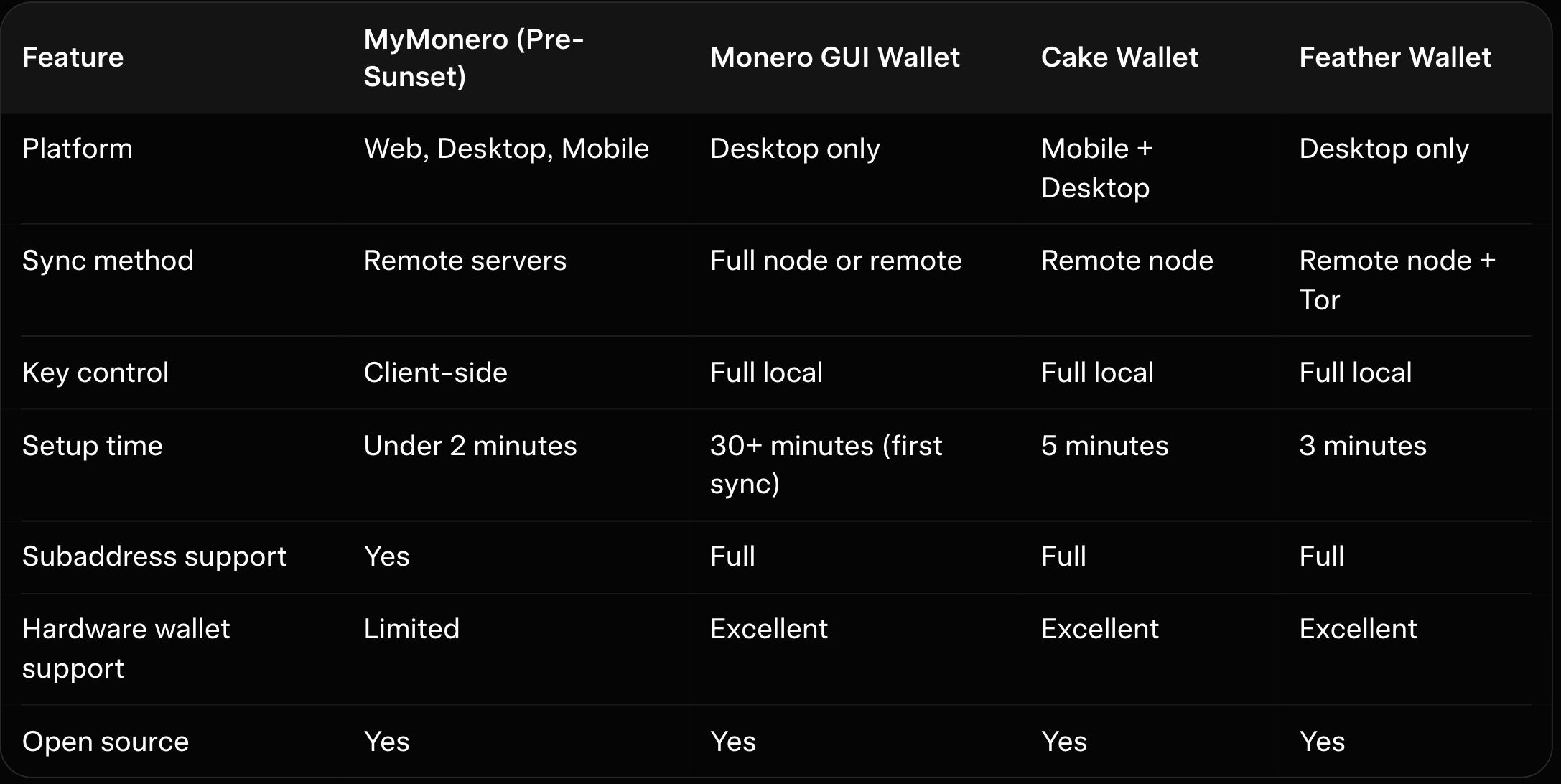
The table reveals why MyMonero appealed to casual users. It sacrificed some privacy for speed and simplicity. Full-node wallets like the official GUI still win for maximum security.
MyMonero’s web version ran entirely in the browser with no installation required. Desktop apps offered slightly stronger isolation by avoiding browser vulnerabilities. Both versions used the same underlying light-client design that kept the experience consistent across platforms.
Security Model and Key Management MyMonero generated your seed phrase client-side and never transmitted private keys to its servers. The service only received view keys for scanning incoming transactions. This non-custodial approach meant you retained full ownership even on the hosted web platform.
However, the centralized scanning servers introduced a single point of failure. If those servers were compromised or logged metadata, timing attacks became theoretically possible. Desktop users mitigated this risk by running the app offline for key operations.
Remote node reliance meant MyMonero servers could see your IP address and transaction patterns. Privacy-conscious users paired it with Tor or VPNs. The trade-off felt acceptable for small daily amounts but less ideal for large holdings.
The open-source code received community audits, and Monero’s broader cryptography (including CLSAG and Bulletproofs) was reviewed by firms like Quarkslab and OSTIF. No major hacks or direct fund losses tied to MyMonero were widely reported. The 2026 shutdown raised questions about long-term sustainability but did not involve any security breach affecting user funds. Seed recovery stayed secure in other compatible software.
Performance and Usability Strengths Setup took seconds because no blockchain download occurred. Users simply entered a seed or created a new one and connected instantly. The clean interface displayed balances, subaddresses, and transaction history without clutter.
Sending and receiving felt effortless even on mobile devices with limited resources. Subaddress generation happened with one click, supporting Monero’s privacy best practices. Former users often praised the intuitive design that required zero technical knowledge.
Performance stayed snappy even during network congestion because servers handled heavy lifting. The desktop version loaded faster than the official GUI on older hardware. This speed made MyMonero the preferred choice for quick P2P trades or donations.
Fees and Pricing
MyMonero charged nothing for its service—no fees or subscriptions. Any revenue came from optional donations. All real costs were the standard Monero network fees paid to miners, based on transaction size in kilobytes.
Risks and Limitations Centralized scanning servers created privacy leakage that full-node wallets avoid entirely. Web version exposure to browser-based attacks remained higher than native desktop apps. The 2026 sunset means no further security updates or bug fixes are coming from the original team.
Users who stored significant amounts faced the migration deadline in early January. Those who missed the transition window needed manual seed recovery into alternative wallets. Our best Monero desktop wallets guide details the safest migration paths available today.
According to the MyMonero closure notice, server data was scheduled for permanent destruction by February 6, 2026, and view keys, addresses and transaction history are not transferred to Cake Wallet; only the 25-word seed restores access.
Real-World Use Cases That Suited MyMonero Beginners and mobile-first users loved the instant access without technical hurdles. Small merchants used it for quick invoice generation with fresh subaddresses. Travelers appreciated cross-platform consistency when switching between laptop and phone.
Privacy purists avoided it for large cold storage but kept a MyMonero instance for daily spending wallets. The light design paired well with hardware wallets for hybrid setups. Our hardware wallet for Monero guide explains how such combinations worked before the sunset.
User Reviews & Reputation
Before the shutdown, MyMonero received mostly positive feedback in the Monero community for its convenience. App-store ratings highlighted speed, clean design, and reliability on mobile. Reddit threads often called it a good starting point for newcomers, though some users preferred the official GUI for full decentralization.
Common praise covered fast sync, intuitive apps, and strong privacy alignment. Complaints centered on occasional node outages, fewer advanced features, and the usual light-wallet trade-offs. Trustpilot and forum posts showed steady, modest approval from long-term holders.
After the January 2026 closure announcement, conversations shifted to migration tips, and many users successfully moved funds using their seeds. The wallet’s reputation remains tied to its Monero core-team roots, leaving it as a respected but now-defunct option. 2026 roundups note its role in making lightweight Monero access more popular before the space changed.
Who is MyMonero Best For?
MyMonero historically suited people who wanted fast, mobile-friendly Monero management without technical hassle. It worked well for travelers, casual holders, or anyone on low-storage devices who valued convenience alongside Monero’s privacy strengths. Power users who demanded full node control or complex features usually looked elsewhere.
Pros and Risks
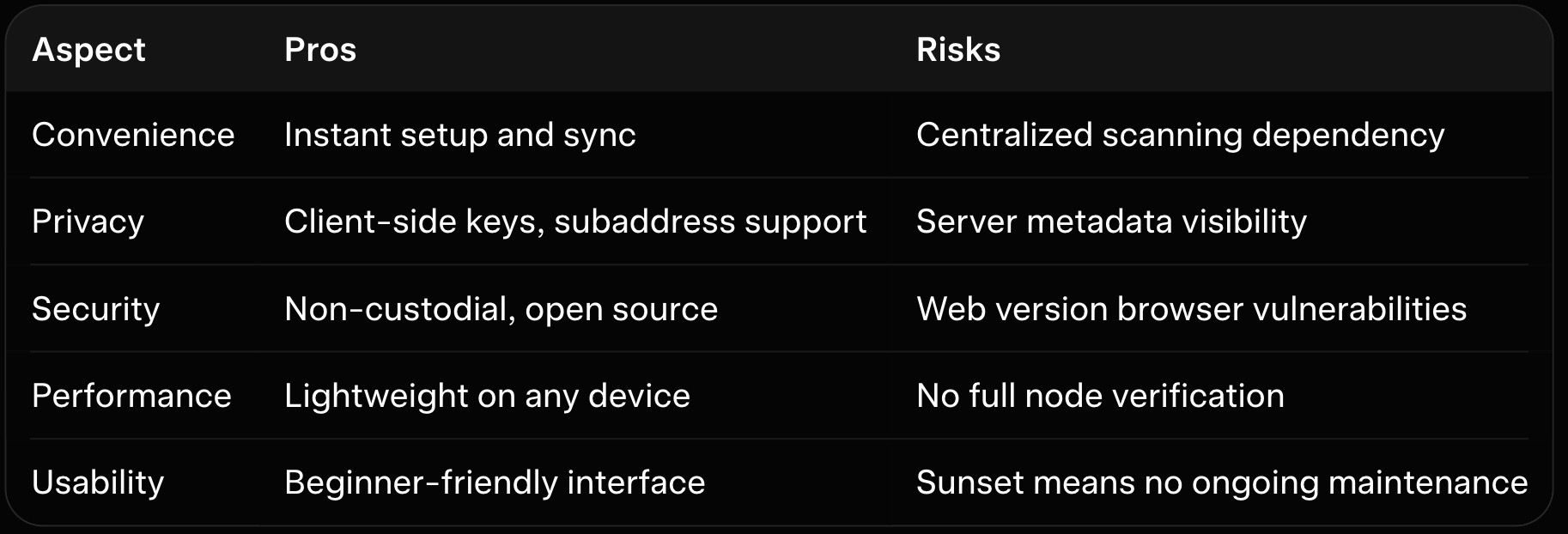
This table summarizes the balanced view MyMonero users experienced. Convenience won for many but required awareness of the risks. Post-sunset, similar lightweight experiences live on in other wallets.
Comparison with Other Monero Wallets in 2026 The official Monero GUI offers maximum control through optional full-node operation but demands more resources and patience. Feather Wallet provides a lightweight desktop alternative with stronger Tor integration and no central servers. Cake Wallet delivers the closest modern match to MyMonero’s ease after the stewardship transition.
Mobile users now prefer Cake Wallet or Monerujo for the same fast remote-node experience without the discontinued MyMonero servers. Our Cake Wallet review and Feather Wallet review highlight why these options feel like natural evolutions. Each alternative improves on MyMonero’s privacy model while keeping usability high.
How Baltex.io Fits Perfectly into Former MyMonero Workflows Former MyMonero users already valued speed and simplicity when moving funds. Baltex.io integrates seamlessly by accepting transactions created in any migrated wallet such as Cake Wallet or Feather. You generate the outgoing payment exactly as you did in MyMonero, send it to a Baltex deposit address, and the platform handles private multi-hop routing in one non-custodial step.
Enable Private Swap mode to add extra shielded Monero legs that maintain unlinkability during conversion to other assets. The process mirrors the lightweight feel MyMonero once provided but removes any single-service dependency. For readers of our best no-KYC Monero swappers overview, Baltex.io consistently ranks highest for users transitioning from light wallets.
Traders who once used MyMonero for quick daily moves now route through Baltex.io after a Cake Wallet restore. Settlement finishes in minutes without waiting for heavy syncs. Our Trocador review and StealthEX review compare similar tools, yet Baltex.io excels when speed and privacy matter most in post-MyMonero workflows.
Small businesses that relied on MyMonero subaddresses for invoices now automate the same flow into Baltex.io for instant stablecoin conversion. The separation between receive and spending layers stays perfect. Our best P2P Monero exchanges guide shows additional off-ramp options that pair naturally with this setup.
Best Practices for Users Migrating from MyMonero Restore your seed directly into Cake Wallet or Feather Wallet for the closest experience. Verify the new wallet address matches your old one before moving funds. Test with a tiny amount first to confirm everything works smoothly.
In Cake Wallet, choose Restore, select Monero and enter the seed; adding a restore height speeds up syncing.
Rotate remote nodes regularly in your new wallet to avoid pattern recognition. Combine with hardware signing for larger balances. Our Monero wallet security best practices provides a complete checklist tailored for former light-wallet users.
Advanced Tips for Maximizing Privacy Post-MyMonero Use Tor or I2P when connecting to remote nodes in your replacement wallet. Generate fresh subaddresses for every receive just as you did before. Our Monero GUI vs CLI wallet comparison helps advanced users decide which interface best replaces the old MyMonero simplicity.
Monitor transaction fees dynamically and avoid peak congestion periods. View-only wallets let you track balances without exposing spend keys. These habits preserve the convenience you loved while strengthening overall privacy.
Conclusion MyMonero carved out a beloved niche as the easiest entry point to Monero for millions of users over ten years. Its lightweight design and fast performance made privacy accessible without technical barriers, even if remote server reliance introduced clear trade-offs. With the January 2026 sunset now behind us, the Monero ecosystem has evolved toward even stronger alternatives that preserve the simplicity users loved.
If you still hold a MyMonero seed, restore it today into Cake Wallet or Feather Wallet and verify your balance. The migration process remains straightforward and secure. When those funds need to move onward, our best no-KYC Monero swappers overview shows exactly why Baltex.io fits every former MyMonero workflow.
For deeper wallet strategies explore our best Monero desktop wallets guide, the Cake Wallet review, or the Feather Wallet review. Monero privacy has never been more accessible, and the tools available in 2026 build directly on the foundation MyMonero helped establish. Your XMR remains yours to control with the right wallet choices ahead.
We cover this in more detail in Instant Swap Services: The Go-To for Privacy-Conscious Users.
We cover this in more detail in Instant Swap Services: The Go-To for Privacy-Conscious Users.
Related reading: XMR.to Alternatives: How to Pay Bitcoin Invoices with Monero.
We cover this in more detail in Zcash (ZEC) vs Monero (XMR): Which Privacy Coin Wins in 2026.
Is MyMonero still usable after January 2026?
Did MyMonero ever custody user funds?
How do I migrate my MyMonero seed safely?
Was the web version riskier than desktop?
Does Baltex.io work with wallets that replaced MyMonero?
Why did MyMonero choose to sunset?
See others posts
G. Khan

How to Buy Bitcoin and USDT in India (INR) (October 2026)
Ecosystem
G. Khan
The 10 Best Places to Buy Crypto Online in 2026
Ecosystem
G. Khan
The Cheapest Way to Buy Crypto: Fees by Payment Method Compared (October 2026)
Ecosystem
G. Khan
How to Buy Bitcoin and Ethereum in Canada (2026)
Ecosystem
G. Khan
How to Buy Bitcoin in the UK and Australia (October 2026)
Ecosystem
G. Khan
How to Buy Solana with a Credit or Debit Card (October 2026)
Ecosystem