 5 minutes to read
 Ecosystem
Monero GUI Wallet Review: Is It the Best Desktop Option?
TLDR The Monero GUI Wallet remains the official and most secure desktop wallet for XMR in 2026, offering full local node synchronization for maximum privacy control, seamless hardware wallet support (Ledger and Trezor), and advanced privacy features integrated directly with the Monero protocol. It excels in security and decentralization but requires significant storage and initial sync time (hours to days for a full node), making it better for long-term holders and privacy advocates than casual users. Compared to lighter alternatives like Cake Wallet or CLI tools, the GUI provides the best balance of usability and security for desktop users. For swapping or managing liquidity from the wallet without KYC, baltex.io enables shielded routing—see our complete Monero XMR guide and best no-KYC Monero swappers guides. Overall, the Monero GUI Wallet is the best desktop option for users who prioritize full control and privacy in 2026.
Monero (XMR) is the leading privacy coin in 2026 because its protocol-level anonymity—ring signatures hiding senders, stealth addresses protecting receivers, and RingCT concealing amounts—makes every transaction unlinkable and untraceable. The official Monero GUI Wallet is designed to give users complete control over their XMR while integrating seamlessly with these privacy features. In 2026, with exchange delistings and growing regulatory pressure on centralized services, many privacy advocates prefer desktop wallets that allow full node operation and hardware wallet integration. This review analyzes the Monero GUI Wallet's installation, node synchronization modes, security architecture, privacy features, hardware wallet support, and usability trade-offs. It compares the wallet with other desktop options and shows how it pairs perfectly with modern liquidity tools.
Installation and Setup
Installing the Monero GUI Wallet in 2026 is straightforward and secure. Visit the official getmonero.org website, download the latest version for your operating system (Windows, macOS, or Linux), and verify the cryptographic signatures to ensure the file has not been tampered with. The installer is lightweight (under 100 MB) and guides you through wallet creation or restoration using your 25-word seed phrase. As explained in our crypto wallet setup guide, always verify downloads and store your seed offline for maximum security.
Once installed, the wallet prompts you to choose a synchronization mode and connect to the Monero network. The entire setup takes minutes, and the interface is clean and intuitive even for beginners.
Node Synchronization Modes
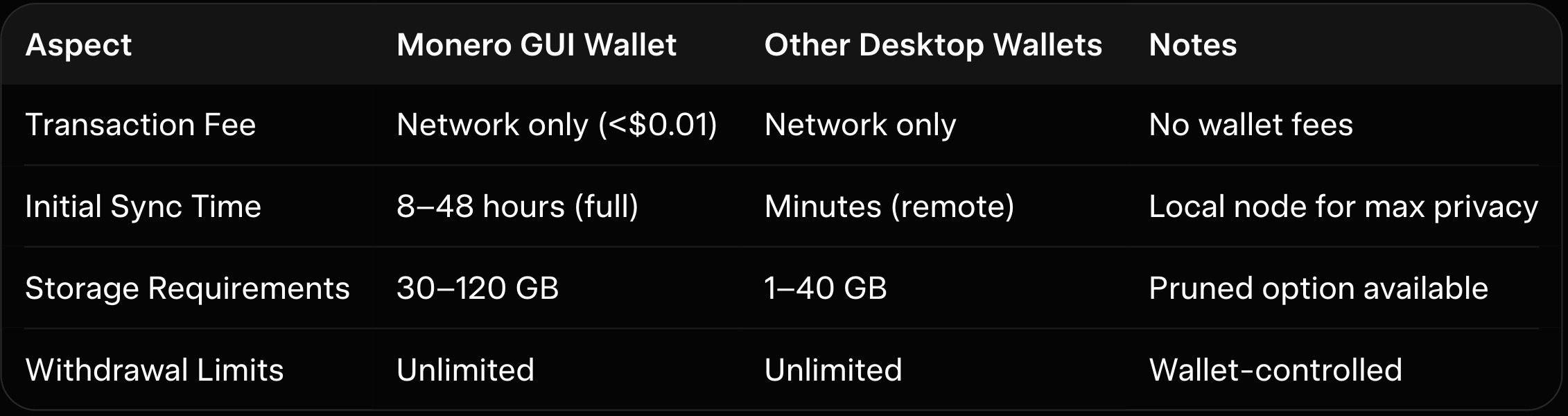
The Monero GUI Wallet offers three main synchronization modes in 2026: full local node, remote node, and pruned node. A full local node downloads and verifies the entire blockchain (currently over 100 GB), providing the highest privacy and security because you control all data. Sync time can take 8–48 hours on first run but is much faster for subsequent starts. Remote nodes connect to community servers for faster setup (minutes) but reduce privacy slightly since the node operator sees your IP. Pruned nodes save storage (around 30–40 GB) while maintaining strong security. As explained in our Monero privacy features explained and Monero FCMP++ upgrade guide, local node mode is recommended for maximum privacy.
Security Architecture and Privacy Features
Security is the Monero GUI Wallet's strongest point. Your private keys never leave your device, and the wallet supports password encryption for the seed and transaction history. It integrates Monero's full privacy suite directly: ring signatures, stealth addresses, and RingCT are enabled by default. Advanced users can enable Tor integration for added anonymity. Hardware wallet support for Ledger and Trezor is seamless, allowing you to sign transactions without exposing keys to the computer. As explained in our complete Monero XMR guide, this architecture makes the GUI one of the most secure desktop options available.
Usability Trade-Offs and Comparison with Other Wallets
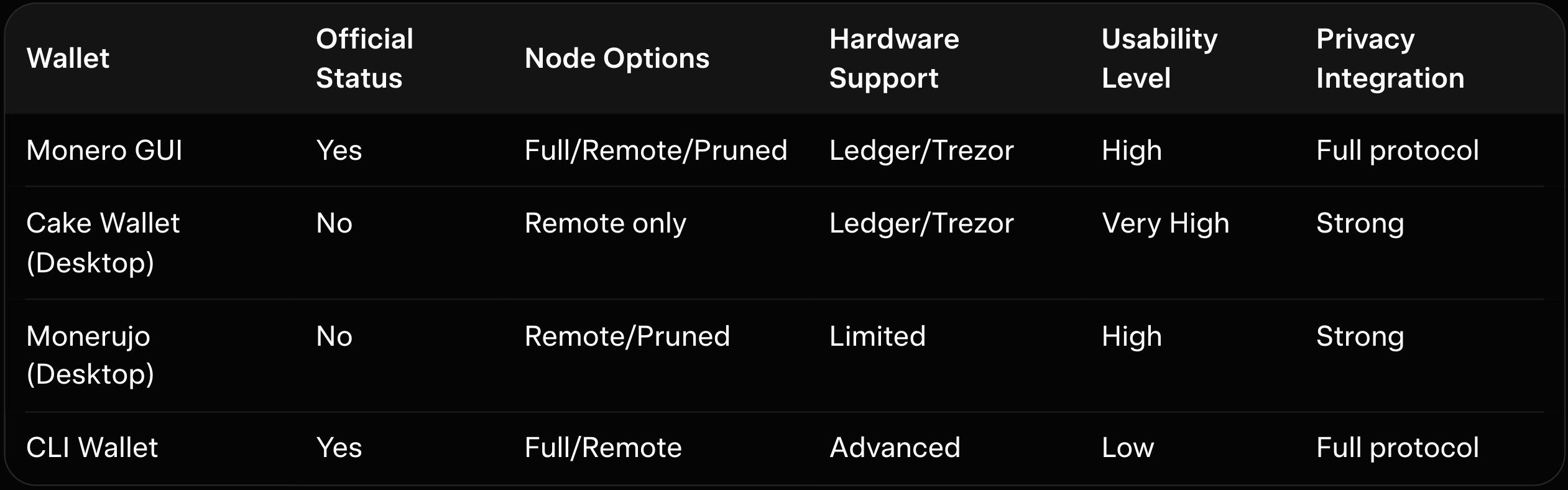
The Monero GUI Wallet offers a clean, beginner-friendly interface with tabs for overview, send, receive, and history. Advanced features like subaddresses and integrated mining are available without overwhelming new users. However, initial full-node sync time and higher resource usage (CPU/RAM) can feel heavy compared to lighter wallets. Cake Wallet (desktop version) is more lightweight and mobile-friendly but less official. The CLI wallet is powerful for advanced users but lacks the GUI's ease of use. As explained in our Monero vs Zcash vs Dash privacy coin comparison, the official GUI strikes the best balance for most desktop users.
Here is the wallet feature comparison table:
Here is a fees and limits context table (2026 averages):
How baltex.io Enables Practical XMR Swaps and Cross-Chain Liquidity
The Monero GUI Wallet excels at secure storage and private transactions, but many users need to swap or move XMR for liquidity. baltex.io enables practical XMR swaps and cross-chain liquidity by scanning multiple no-KYC routes and liquidity sources internally. Private Swap mode inserts shielded Monero hops that fully break on-chain links using ring signatures and stealth addresses before delivering clean assets on destination chains. Settlements complete in 8–35 minutes even for cross-chain pairs, fees stay low at ~0.4–0.8%, and there are virtually no limits. Supporting over 10,000 tokens across 200+ networks without manual bridging, baltex.io delivers true one-click optimization directly from your GUI wallet.
Users managing mined or held XMR benefit enormously—especially when pairing with tools covered in our best no-KYC Monero swappers and how to swap USDT to XMR privately. Use the GUI for secure storage and switch to baltex.io when liquidity or cross-chain moves are needed.
Conclusion
The Monero GUI Wallet in 2026 is the best desktop option for users who prioritize security, official development, and full privacy control. Its local node capabilities, hardware wallet support, and seamless integration with Monero's protocol make it superior for long-term holders and privacy advocates. While initial sync time and resource usage are higher than lighter wallets, the trade-offs are worth it for maximum decentralization. Pairing the GUI with tools like baltex.io makes liquidity management easy and private.
Always verify downloads, use hardware wallets for large holdings, and keep your seed phrase offline. Explore more strategies in our complete Monero XMR guide, Monero privacy features explained, and best no-KYC Monero swappers guides to manage your XMR securely.
You can read our full breakdown in SimpleSwap Review 2026: Pros, Cons, and Monero Exchange Fees.
We cover this in more detail in Instant Swap Services: The Go-To for Privacy-Conscious Users.
Related reading: XMR.to Alternatives: How to Pay Bitcoin Invoices with Monero.
Related reading: Zcash (ZEC) vs Monero (XMR): Which Privacy Coin Wins in 2026.